

Features
Everything recorded. Everything traceable.
When you run the shop alone, everything lives in your head. The moment you have a team, the uncomfortable questions arrive: who changed that price? Who gave a discount that big? Why was this receipt edited? Without traces, those questions turn into drama and mutual suspicion — and the owner loses the peace of mind to ever leave the shop.
Automan gives access, work, and data changes a clear trail. This isn’t about distrusting staff — it’s about everyone sharing one source of truth, so “who changed this?” is answered by data, not by guessing games.
Access that fits the role
Not everyone needs to see everything. Automan sets permissions role by role, down to the individual menu: owner, front desk, technicians, cashiers, and purchasing each see and change what belongs to their job. Cashiers don’t need margins; technicians focus on their job records; the owner holds the full picture. You set the boundaries.
The principle behind a good boundary is not suspicion, it is scope. A person should be able to reach everything their job requires and nothing that would let a routine mistake become an expensive one. Most damage in a small business is not theft — it is a tired person on a Friday afternoon editing the wrong record because the system let them.
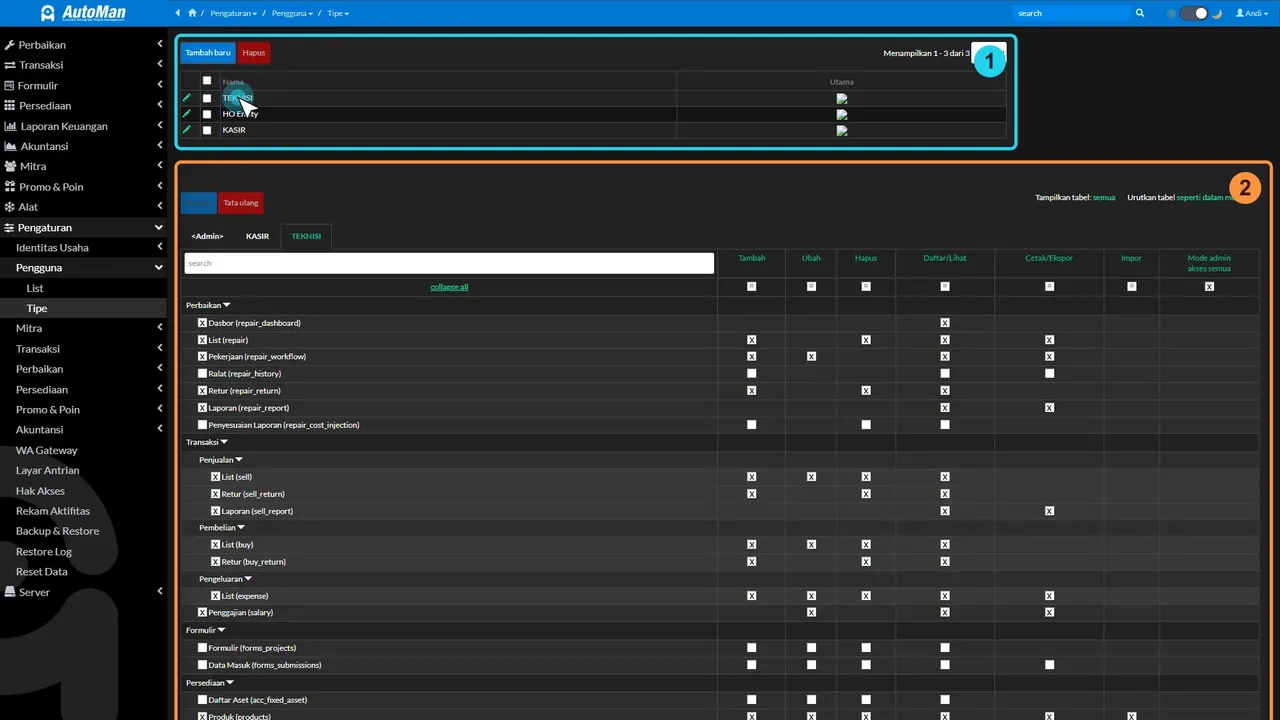 Role-based permissions: the owner decides who may do what.
Start with the change that costs nothing
Before any of the settings below matter, one habit has to go: the shared login.
A single account used by everyone is the most common arrangement in small repair shops, and it quietly disables every safeguard on this page. The change log still records what happened, but every entry names the same user, so no question that begins with “who” can ever be answered. Give each person their own login and the trail starts meaning something on day one — no configuration required.
Roles in a workshop are not roles at a counter
You name the roles yourself, and that is as it should be, because the two trades are structured differently from the ground up.
At an electronics counter, the usual split is cashier, technician, front desk, and owner. The exposure sits in the till and in service pricing: the units are small and so are the amounts, but the transaction count is high — which is how a Rp 20,000 discount repeated fifty times a month goes unnoticed until the monthly report is opened.
In an auto workshop, the usual split is cashier, mechanic, and workshop manager. The exposure moves. The value per visit is far larger, and the most common source of a discrepancy is not discounted labour but parts recorded as used. A set of brake pads booked to a job that never received them, or oil leaving the shelf without attaching to any job at all, shifts the cost of that visit immediately.
Sensible boundaries follow the exposure:
| Role | Usually needs | Usually does not need |
|---|---|---|
| Cashier | take payment, print receipts | change service prices, open profit reports |
| Mechanic / technician | record work done and parts consumed | change selling prices or void receipts |
| Workshop manager / front desk | see the queue, assign work | shop settings and the books |
| Owner | everything | — |
That table is an example, not a template you have to adopt. Permissions are set separately for each role, so rearrange it until it matches how your team actually works.
One vocabulary note: choose a vehicle business type and the role called Technician at a counter appears as Mechanic throughout the app, including in permission settings and in the change trail. The trail says mechanic because that is what you call them on the floor.
The difference even shows up in the questions people ask. At a counter it is usually “why did the screen replacement drop from Rp 250,000 to Rp 150,000?” In a workshop it is more often “why are two sets of brake pads booked to one car?” — and both are answered the same way: open the history, read who and when.
A change trail you can follow
- App change log — important changes are recorded: who, when, and what changed.
- Corrections with history — fixing a receipt doesn’t erase its past; the history stays.
- Shadow login — the owner or an admin can assist staff from that person’s own point of view to resolve an issue, without swapping accounts.
The correction behaviour deserves a sentence of its own, because it is where most informal systems fail. When a receipt is amended, the earlier version is not overwritten — it is kept as history and a revised version is issued alongside it. That means a document can be followed from the moment it was created to whatever it looks like now, which is exactly what you need when the cash drawer and the day’s takings disagree and everyone is certain they did nothing unusual.
Shadow login solves a smaller but daily irritation. Staff hit something they cannot get past, and the usual remedies are all bad: ask for their password, make them log out, or walk over and take the keyboard while a customer waits. Seeing the same screen they see, from your own account, ends the problem in a minute without anyone sharing credentials.
Not surveillance — protection for honest work
Audit trails get mistaken for spying. It’s the opposite: when all work is recorded, honest technicians are protected because their work is provable, and baseless accusations die quickly. The only thing disadvantaged is bad intent — as it should be. The same traces also power fair commission calculations.
Consider the alternative from a mechanic’s side. In a shop with no records, a customer complaint about a job done three weeks ago is settled by whoever argues most confidently, and a missing part makes everyone in the building a suspect equally. Neither outcome favours the person who did the work properly. A trail is the only thing that lets a good employee prove a quiet day was an honest one.
It is worth saying out loud to your team, too. Introduced without explanation, permissions read as an accusation; introduced as “so nobody has to defend themselves from memory,” they read as what they are.
Once you have more than one location
Delegation gets harder, not easier, when a second site opens — you cannot be in both. Permissions carry into that world as well: who may send a stock transfer between branches, who may confirm what arrived, and who may copy products or settings across are all separate rights. A branch manager can be trusted to receive shipments without also being handed the shop’s settings.
What this feature is, and what it is not
It is about authority and traceability: who may do what, and what changed afterwards. That is not the same as infrastructure security, and we are not going to blend the two to sound more reassuring than we have earned. If a vendor answers “is my data safe?” by describing their permission screen, they have changed the subject.
Two other facts belong in the same honest paragraph: Automan is priced in Indonesian Rupiah — Lite at Rp 0, Pro at Rp 15,000 per month — and support runs in Bahasa Indonesia. Neither affects how permissions behave; both affect whether we are the right fit.
Why this matters once you have a team
An owner who can’t leave the shop is an owner who’s trapped. With role-based access and a clear change trail, you can delegate without losing control — knowing that whatever happens, there’s a record. That’s what turns a shop from “someone has to babysit it” into a business that can actually be managed.
The test is concrete. Could you take a week away and, on your return, reconstruct what happened without interviewing anybody? If the answer is no, the constraint on your business is not demand or staffing. It is that the shop’s memory lives in one head, and that head needs a holiday.
The Lite plan is free with no card required, so the way to judge this is to set up real roles for your real team and watch a normal week. Start from the button above, or see the repair workflow demo for how job records and statuses make the division of labour visible in the first place.
FAQ
Won't my technicians feel like they're being watched?
Can cashiers, technicians, and front desk each get different access?
I run a garage. Are the roles still cashier and technician?
Does this make my shop data secure?
Related reading
- Feature
Repair Management
Job records and statuses make the division of work visible.
- Feature
Technician Commissions & Payroll
The same work traces power fair commission math.
- Feature
Multi-Branch Transfers
Decide who may send, receive, and copy across locations.
- Trade
Auto Repair Shop Software
Cashier, mechanic, workshop manager — and where a garage actually leaks.
- FAQ
Automan FAQ
Answers about data, permissions, and missing menus.
Already know the problem?
See the workflow demo that matches it.