

Features
Every job is traceable, from the moment it arrives to the moment it leaves
Profit in a repair business rarely leaks through one big mistake. It leaks slowly through small things nobody wrote down: a car that sat for two days because everyone assumed someone else had started it, oil and filters that left the shelf without reaching a cost calculation, a warranty given verbally that turns into an argument, a customer who gave up after “ready tomorrow” missed three times. A workshop can be full every day and still finish the month thin — not because the pricing is wrong, but because the work leaves no trail.
This is where job management differs from a till. A till ends at “goods out, money in”. Repair work lives entirely in the gap between arrival and collection: what condition the thing was in, what the customer complained about, what it might cost, who is working on it, which parts got consumed, what warranty applies, and what was signed for on the way out. Automan records that whole journey as one traceable workflow.
The app calls a car a vehicle, not a “repair item”
The most common reason software gets abandoned in a workshop is that it speaks a foreign dialect. A mechanic asked to fill in a field labelled “repair item” and another labelled “symptoms” will fill them in carelessly for a week and then stop entirely.
Automan handles this by changing its vocabulary across the entire application when you select a vehicle business type, rather than pasting a label on one screen:
| What it means | Electronics repair | Vehicle workshop |
|---|---|---|
| The person doing the work | Technician | Mechanic |
| The thing being worked on | Repair Item | Vehicle |
| Its category | Item Type | Vehicle Type |
| Its make | Unit Provider | Vehicle Brand |
| Its model | Model | Model / Variant |
| What the customer reports | Symptoms | Customer Complaint |
The identity fields change too. A counter records IMEI and serial numbers; a workshop records the number plate, chassis number, engine number, odometer reading and year of manufacture. Looking up history means typing a plate — which is how customers and mechanics refer to a vehicle anyway, and never how they refer to a chassis number.
One honest note about that odometer: the reading is recorded, not used to trigger anything. Automan does not calculate the next service due, and it does not send reminders based on distance travelled. Anyone selling you mileage-based service reminders is selling something Automan does not have.
The first ten minutes decide the rest of the job
The quality of a repair is settled at the intake desk, not at the bench. Whatever is left blank at booking-in becomes an argument at collection. Automan enforces a floor through the intake form instead of relying on whoever happens to be on the front desk.
In a workshop, the intake checklist follows what is genuinely inspected when a car arrives: registration document, ignition key, bodywork condition, glass and wipers, exterior lights, tyres and wheels, brakes, fuel level, and the odometer. It is ticked in front of the owner, not reconstructed afterwards. Equipment that came with the car — spare wheel, jack, tool kit, warning triangle, remote — is logged for the same reason: it is precisely what gets disputed a week later.
At a counter, the content differs and the purpose does not: device type, IMEI or serial, a physical condition checklist for scratches, cracks and missing components, accessories such as SIM, memory card, charger and box, and the screen lock if the unit must be opened for testing.
Both end as an intake receipt carrying the complaint, the condition, the estimated cost and the warranty terms — printed or sent by WhatsApp. Written evidence protecting both sides from the first minute.
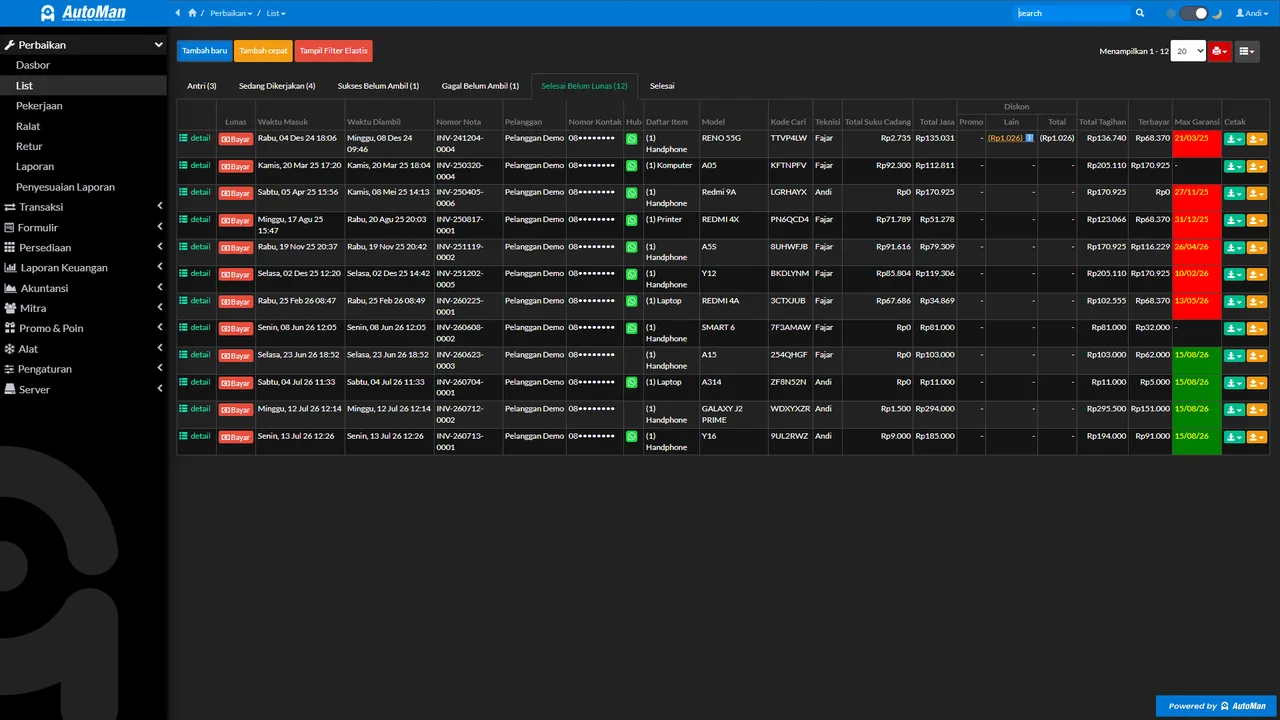 Repair list: switch between statuses, then inspect items, technicians, charges, payments, and warranties for the selected transactions. (App UI shown in Indonesian.)
A work board that shows what is stuck, not just what is moving
A good work board does more than list jobs. It tells you what to start next and, far more usefully, what has stopped. Automan uses statuses that match what physically happens: Queued, In Progress, Waiting for Parts, Awaiting Confirmation, Done, Picked Up, and Cancelled.
Look hard at “Waiting for Parts”. In a workshop this status occupies literal square metres: a car parked out back waiting for a component nobody is certain was ever ordered, an owner ringing daily, and no agreement about when the wait started. At a counter it is smaller and more numerous — a drawer of handsets waiting on screens and ICs.
Given its own readable status, that work stops disappearing. You can see how many jobs are held, since when, and chase the supplier before the customer chases you. The board filters by status, by mechanic, or by priority, and because where the vehicle is parked is recorded, nobody loses five minutes walking the yard looking for a blue hatchback.
Job records: who did what, with which parts
The heart of a trustworthy repair operation is the job record — the log of what was actually done, entered by the person who did it. Every job carries its own history: the actions taken, the parts consumed (which reduce stock and build cost through spare parts inventory), the labour charged, the name of the mechanic or technician, and photos of the work.
That record earns its keep in three directions at once:
- Accountability. When the same vehicle returns a week later with a similar complaint, the history shows whether this is a new fault or unfinished work — including which oil went in and which pads were fitted.
- Warranty claims. Because the record locks at handover, it stands as evidence rather than as a story reassembled from memory under pressure.
- Fair profit sharing. The same trail is what commission is calculated from, which ends the monthly argument about who did more.
 Job record: open it from the repair log, then record actions, results, parts, services, photos, and job status. (App UI shown in Indonesian.)
Estimates, then a stop at Awaiting Confirmation
The most common dispute in repair work is not about quality. It is about a bill that surprised somebody.
This bites hardest in vehicle work, because the sequence demands it: strip it down, find out what is actually wrong, then price it. Automan carries that sequence with an estimated cost field completed at intake, which prints on the intake receipt. The owner goes home holding a figure instead of a feeling.
Then, when the number moves once the job is opened up, the work does not quietly carry on. It stops at Awaiting Confirmation, and stopping here means stopping: the status itself holds the job until somebody decides. After the owner has been reached, the job moves to Confirmation Approved and proceeds, or to Confirmation Rejected and the unit is prepared for collection. Either way the decision sits on the record instead of in the memory of whoever made the call.
Be clear about who does what. Your staff enter that decision after phoning or messaging the customer; there is no accept button on the customer’s side. What the customer sees on the tracking page is the status — which means “why hasn’t my car been touched yet” has an answer they can read for themselves: because it is waiting on their answer.
The part most shops underestimate is on their own side of the counter. A job parked at the confirmation stage is the easiest kind of job to forget — the customer has not replied, nobody chased it, and the car quietly occupies the yard for a week. Automan flags jobs that have sat too long without moving, so the stalled ones surface before they turn into complaints.
Handover and warranty: closing the loop with evidence
Collection is the moment most likely to go wrong and most likely to decide whether somebody comes back. Automan provides a dedicated handover form: a function-test checklist ticked in front of the customer — screen, signal and camera for a handset; brakes, lights and engine note for a vehicle — with promotions and points applied automatically and the balance settled on one screen. That includes payment taken in parts — some cash, the rest by transfer or QR. Each part lands in its own payment channel, and if the total still falls short of the invoice, the remainder becomes a receivable rather than being rounded away.
As the unit leaves, the warranty clock starts and its terms attach to the invoice. Seeded periods are 7 days, 14 days, 1 month and 3 months, and they can vary by type of work. The unit’s full history then locks as the final record.
The effect is small to describe and large to live with: the customer leaves confident the thing was tested in front of them, and you hold written cover if a claim arrives three weeks later.
Fewer “is it ready yet?” messages
The hidden tax on a busy shop is answering the same question forty times a day. Automan cuts it from two directions: customers can look up the job themselves using the code on their receipt, and each status change can trigger an automatic WhatsApp message sent from the server — intake confirmation, work started, ready for collection — without anyone picking up a phone.
Who this fits
- Car workshops — vehicles stay overnight, parts get ordered, and several people touch one job. Plates, a recorded parking place and a visible waiting-for-parts queue stop the yard becoming a car park.
- Motorcycle workshops — high volume, fast turnaround, repeat customers. History by plate tells you what was done last time without asking the rider.
- Phone repair counters — dense queues of near-identical units, where per-unit identity prevents mix-ups.
- Laptop, electronics and appliance repair — long jobs with many parts, where a written estimate and an intact history decide the outcome when a unit returns.
- Teams — the owner sees who did what through their job records, while access control governs who may change anything.
Five questions that separate repair software from a till with a repair menu
Plenty of products claim to handle repairs. The fastest way to test one is not to read its feature list but to ask five things that only exist in this trade:
- Does the job record lock at handover, so the history is admissible during a warranty claim?
- Can the warranty period differ by type of work, rather than one figure for everything?
- Can a part pulled off another unit be recorded with a value, instead of being treated as free?
- Is there a distinct status for work held waiting on parts, separate from work in progress?
- Do the on-screen labels change with the trade, or must a mechanic learn to call a car a “repair item”?
If the answers are no, that product is not bad — it was simply built for different work. Automan started from the repair workflow and grew a till afterwards, which is the order that explains why those five questions have answers here.
One workflow, and the rest follows
The strength of job management is not any single feature. It is what happens next without anyone re-entering anything. When a job is finished and paid: consumed parts reduce stock and form cost, labour becomes revenue, commission calculates, cash or a receivable is created, and all of it reaches owner financial reports and the accounting journals. You record once; the system connects the rest.
One boundary worth knowing before you plan: a single Store App serves one kind of unit — vehicles or general electronics. If you run a motorcycle workshop and a phone counter, they operate as two Store Apps under one account, precisely so the terminology and the checklists stay right for each.
Before you start: the honest part
Automan is built and priced in Indonesia — Lite at Rp 0, Pro at Rp 15,000 per month, no separate USD list — and support runs in Bahasa Indonesia. The application interface is Indonesian, which the screenshots on this page show rather than hide. The vehicle catalogue ships seeded with brands common across Southeast Asia. None of that changes how the workflow behaves; all of it changes whether we are the right fit, and you should weigh it before you spend an evening on setup.
Start with one job
You do not have to decide everything today. Put one unit through from intake to handover, then look at what appeared in the reports without you typing it twice. Lite is free permanently and needs no card.
Start free with the button above, watch the repair workflow demo, or read the wider picture for auto repair shops and phone repair shops.
Estimates and the confirmation stage: how it actually runs
An estimated cost is captured when the vehicle or unit is booked in, and it prints on the intake receipt, so the customer leaves holding a number rather than an impression. When the figure has to be checked before work continues, the job stops at Awaiting Confirmation — it does not quietly proceed — and then moves to Confirmation Approved or Confirmation Rejected, with the decision kept on the record. One thing to be precise about: your staff record that decision after speaking to the customer. The tracking page shows the customer where the job stands; there is nothing there for them to tap.
FAQ
Does the app change its wording if I run a workshop rather than a phone counter?
Does Automan remind customers when the next service is due by mileage?
Why can a job record not be edited after the unit is picked up?
Are customers notified automatically when the status changes?
Can several mechanics use it at once?
How is repair warranty recorded and claimed?
Can I book jobs in from a phone?
Related reading
- Feature
Repair Status Tracking
Customers check the job themselves instead of messaging you.
- Feature
WhatsApp for Repair Shops
Receipts and status updates sent automatically from the server.
- Feature
Spare Parts Inventory
Parts consumed on a job leave stock at the right cost.
- Feature
Returns, Claims & Corrections
A system that stays organised when a job goes wrong.
Already know the problem?
See the workflow demo that matches it.