

Features
One invoice for parts and labour, with the stock already handled
The counter in a repair business does two jobs that behave nothing alike, in the same queue, all day. Some of what you sell comes off a shelf and has a cost attached to it: oil, filters, brake pads, batteries, screens, accessories. The rest is labour — an oil change, a brake service, a wheel alignment, a screen fitting — which consumes hours rather than stock.
Retail point-of-sale software only understands the first kind. Force both through it and the end-of-day figures lose their shape: the stock count drifts, labour margin never appears as its own number, and a healthy-looking turnover explains nothing about where the money came from.
Automan keeps goods and labour distinct inside a single invoice. Goods leave the delivery they actually came from and carry that cost with them; labour posts as revenue; both arrive in the reports without anyone re-typing the day.
One invoice, two kinds of revenue
In a workshop. A car comes in for a routine service. The finished invoice holds four litres of engine oil, an oil filter, an air filter, the servicing labour and the oil-change labour. On the way out the owner picks up a bottle of coolant to keep in the boot.
Through a generic till, all of that collapses into one line — “car service” and a total. A month later you cannot say how much oil actually left the drum, how much of your income was labour rather than parts, or what any individual job really earned.
At a counter. Different objects, identical damage. A screen replacement means the screen itself, the fitting labour, and a camera protector bought at the front desk. Merged into one line, the screen that left the drawer was never recorded as leaving at all.
In Automan the till takes goods as goods and labour as labour on the same document. The oil and filters reduce stock at the cost of the delivery they came from, the service labour posts as service revenue without touching inventory, and the coolant is an ordinary retail sale. One piece of paper for the customer; three correct records for you.
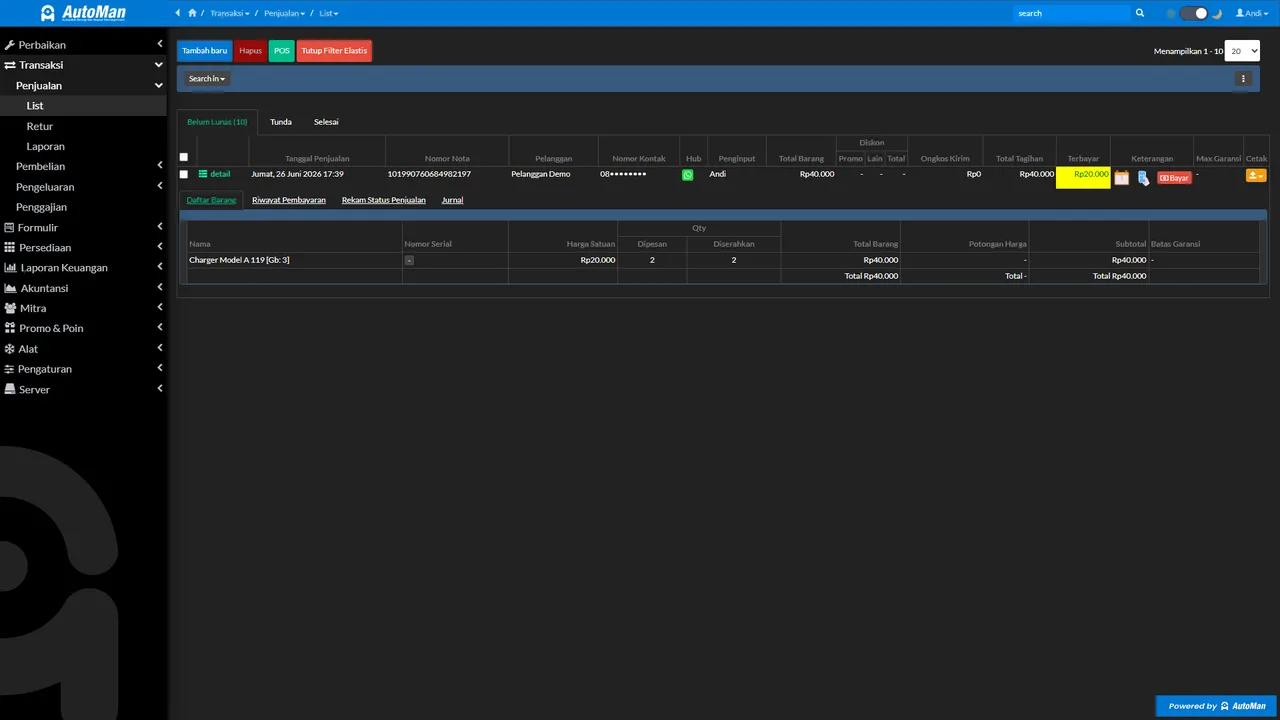 Sales SLS: from one invoice, inspect items, installment payments, transaction status, and the resulting journal. (App UI shown in Indonesian.)
Why a retail till never quite fits
A retail POS assumes one short, linear event: the customer picks something up, you scan it, they pay, they leave. Everything happens within two minutes at one counter.
Repair work does not behave that way. The vehicle or the unit arrives first. It gets inspected, an estimated cost is recorded and printed on the intake receipt, the work gets done, and collection happens hours or days later. At collection the person taking payment needs to pull up that job — what was done, which parts the mechanic or technician consumed, what was already paid on intake.
Automan joins those two moments because repair management and the register read the same operational data. Parts consumed sit on the job; goods and labour can share one invoice. There is no step where somebody copies figures from the job sheet into the till.
Worth knowing while we are here: if the estimate has to be checked before work continues, the job holds at Awaiting Confirmation and moves on only once it is marked approved or rejected — so nothing reaches the till that the customer never agreed to. Your staff enter that outcome after speaking to them; there is no accept button on the customer’s side. What the app guarantees is that the number was written down and printed before work started, which is the part that ends most disputes.
Retail trade running alongside the workshop
Almost no repair business sells labour alone.
Workshops sell oil over the counter to people who change it themselves, fit and sell batteries on the spot, and move plugs, wiper blades and small accessories all week. Many bundle work into packages — oil plus filter at a single price, or a tune-up sold as one labour item.
Counters sell accessories and loose parts to other technicians buying in small bulk, sometimes in a longer queue than the repair intake itself.
All of it runs through the same register. Product lookup by code or barcode keeps a queue moving, and multi-unit items handle everything bought by the jug or the box and sold by the litre or the piece.
Money that has not fully arrived still has a name
This is the record that informal systems lose most often, and workshops lose it more than counters do.
A car is finished at five in the afternoon. The owner pays part of it and promises the rest next week, because they need the vehicle tonight. In a paper ledger that event usually survives as a note in a margin, and only until the page turns.
In Automan the unpaid balance becomes a receivable against that customer. It does not vanish, and it does not disguise itself as cash already banked. When you ask how much money is out with customers, there is a figure, not an exercise in recollection.
The same holds when payment arrives in pieces. One invoice can be settled part in cash and part by transfer or QR, and each portion lands in the payment channel it actually went to rather than all of it being called “cash” for convenience. If the pieces still fall short of the total, the shortfall becomes a receivable on its own — nobody has to round the invoice up to make it look settled.
What one keystroke does
Saving a transaction sets off several things at once, none of which you have to do by hand:
- Stock leaves the delivery it came from in spare parts inventory.
- Its cost comes with it, under the FIFO or average method you selected.
- Labour revenue stays separate from goods revenue.
- Payment taken in several parts lands in the right channels, and any shortfall becomes a receivable against a named customer.
- Promos, points and coupons apply under the rules you set in customer acquisition tools.
- The figures reach owner financial reports without a manual recap.
If the customer comes back with the wrong part or a faulty one, the reversal runs through returns, claims and corrections rather than by deleting an old invoice and pretending the sale never happened. Deleting history is how a set of books stops being evidence.
Promotions, points and receipts at the counter
A flat percentage discount is the easy part, and it is where most tills stop. Automan runs a conditional promotions engine at the point of sale instead: conditions you define — a minimum spend, particular products or services, members only, specific days of the week — paired with rewards that are not always money off. A promotion can award points, issue a coupon for the next visit, or add warranty cover rather than shaving the margin on the sale in front of you.
Loyalty points are earned and redeemed at the register itself, which matters more than it sounds. A points scheme that lives on a paper card in somebody’s wallet is a scheme nobody redeems. One that appears automatically when the customer’s name is selected is a reason to come back to you rather than to whoever is nearest next time.
The receipt itself is ready to print or to send through WhatsApp, which is how most customers in this market would rather receive it. For a workshop that means the invoice, the parts fitted and the warranty terms end up somewhere the owner can find them in six months, instead of in a glovebox with the folds worn through.
Cost read, not remembered
The gap between a connected till and a disconnected one shows up most clearly in one number: what the item cost you.
You sell a battery and assume the cost you remember from the last invoice. In the meantime the supplier raised the price and freight is being apportioned per unit. Every battery you sell now reports a margin that is too generous by a margin you never see. Twenty a month is enough to make your pricing decisions wrong.
In Automan the cost is read off the stock card under your chosen costing method. When cash still fails to reconcile, you go looking in the places that can actually explain it — payment channels, receivables, returns, a mistyped entry — instead of in an assumption nobody ever wrote down.
What changes from the owner’s chair
Turnover stops being one opaque figure. You can see what labour earned and what goods earned, and those two want completely different decisions from you.
Stock reconciles without a monthly argument. Because every sale moves stock as it happens, a count becomes a check rather than an investigation.
A new counter hand is useful on day one. Find the item or the service, add it, save. The complicated part happens behind the screen.
Receivables have names and dates. Chasing a balance stops feeling like an accusation and starts being a routine call.
Two honest notes before you move the counter
Automan is built and priced in Indonesia: Lite at Rp 0, Pro at Rp 15,000 per month, no separate USD list, and support in Bahasa Indonesia. The register logic behaves the same anywhere, but the helpdesk you will reach speaks Indonesian first, and you should weigh that before your daily takings depend on it.
There is also no offline mode in the web register. If the connection drops mid-queue, the till waits with you. Plenty of shops never notice; a workshop at the end of a long rural line will, and that is worth testing on a quiet weekday rather than discovering on a Saturday. The exception is field sales: through the Automan Mobile Android app, a canvasser’s transactions queue on the phone while the signal is gone and send themselves once it returns.
Run it through one real day
The honest way to judge a till is not a feature list. Put one complete job through it — parts, labour, a partial payment — then open the report and see whether the numbers describe the day you actually had.
Lite is free permanently and needs no card, so that test costs you an afternoon rather than a budget line.
Prefer to look first? Follow the repair workflow demo from intake to final invoice, read the wider picture for auto repair shops or phone repair shops, and compare the plan limits on the pricing page.
Two limits, stated up front
First, the Automan web register needs a live internet connection. In the web version there is no offline till mode and no queue that syncs once the signal returns, so a bay with patchy coverage should test that before the counter depends on it. For field sales, the Automan Mobile Android app keeps working when the signal drops — transactions queue on the phone and send themselves once it returns. Second, the free Lite plan caps the day at 10 sales, 5 repair jobs, 20 purchases and 40 returns; a busy Saturday will need Pro at Rp 15,000 per month.
FAQ
Does clicking save twice create a duplicate transaction?
Can I put parts and labour on the same invoice?
Does stock decrease automatically when I sell?
Can I sell from a phone?
A customer pays half now and half next week. How is that recorded?
How is this different from the retail POS I already use?
Related reading
- Feature
Spare Parts Inventory
Every sale reduces stock and takes its real cost with it.
- Feature
Customer Acquisition Tools
Promos, points, and coupons run right at the register.
- Feature
Returns, Claims & Corrections
Sales returns recorded all the way to stock and receivables.
- Feature
Owner Financial Reports
Counter takings arrive as profit and loss, not as a shoebox.
Already know the problem?
See the workflow demo that matches it.