

Automated Reminders
Collect Due Bills and Prompt Unit Pickups Without Keeping It in Mind
Unpaid bills linger because manual follow-ups feel awkward, while repaired devices sit on shelves forgotten by customers. Automan automated reminders deliver timely WhatsApp messages on schedule, bringing cash home and clearing workbench space.
- Web
Free to start · no credit card
How it works
From first use to everyday habit.
-
Select a reminder trigger
Choose what to monitor, from overdue receivables and stagnant repairs to low stock alerts.
-
Set schedule and sending hours
Decide whether to send on, before, or after the event at a polite hour during the day.
-
Define recipients and target filters
Pick customers, technicians, suppliers, or the owner, then narrow by service type or customer tier.
-
Draft dynamic message templates
Write personal messages that auto-fill customer names, ticket numbers, or balances without manual typing.
What it does
Collect Overdue Customer Invoices
Send automatic payment nudges to customers before or after their invoice due date.
Prompt Finished Unit Pickups
Remind customers to pick up completed devices so workbenches stay organized and clutter-free.
Notice Before Warranty Expires
Message customers a few days before their repair warranty ends to build lasting trust.
Monitor Problematic Inventory Stock
Receive direct alerts on your phone whenever spare part stock runs low, dormant, or negative.
Daily Summary Shop Reports
Receive daily sales, repair count, and financial recaps pushed to your WhatsApp each evening.
Personal Dynamic Message Masking
Each text fills in real customer names, ticket numbers, and amounts for a genuine personal tone.
The full picture
Many costly leaks in repair shops and garages happen not from poor technical repair work, but from crucial details that slip people’s minds. Completed repairs leave the shop without final payment, service warranties expire unannounced, finished devices sit on shelves for weeks, and replacement parts run dry just as a customer walks in. Automated Reminders in Automan solves these everyday oversights: the system inspects store records on a scheduled routine and dispatches targeted WhatsApp messages to the right recipients at the chosen time.
Uncollected money and crowded shelves from relying on memory
Amid the rush of front counter customer service and intricate workbench troubleshooting, following up on unpaid balances often gets pushed aside. Technicians concentrate on completing tricky repairs, counter staff handle the continuous walk-in queue, and store owners naturally hesitate to call customers individually just to chase down overdue balances or down payments. As a consequence, working capital that should fuel daily business operations remains tied up in unpaid invoices outside the shop.
The same problem haunts finished units awaiting collection. Customers who do not receive a clear follow-up message often forget to pick up their gear. Storage shelves quickly become overcrowded, the risk of misplacing devices increases, and the shop floor loses valuable space. Relying on paper notes, wall calendars, or staff memory invariably breaks down as daily ticket volumes grow.
Working on a schedule rather than waiting for clicks
Standard notifications react instantaneously after a specific action occurs, such as sending a receipt the second a cashier saves a sales transaction. Automated Reminders operates on an entirely different principle: the system routinely scans store data to catch occurrences that have not taken place or events that risk being overlooked because no active transaction triggered an update that day.
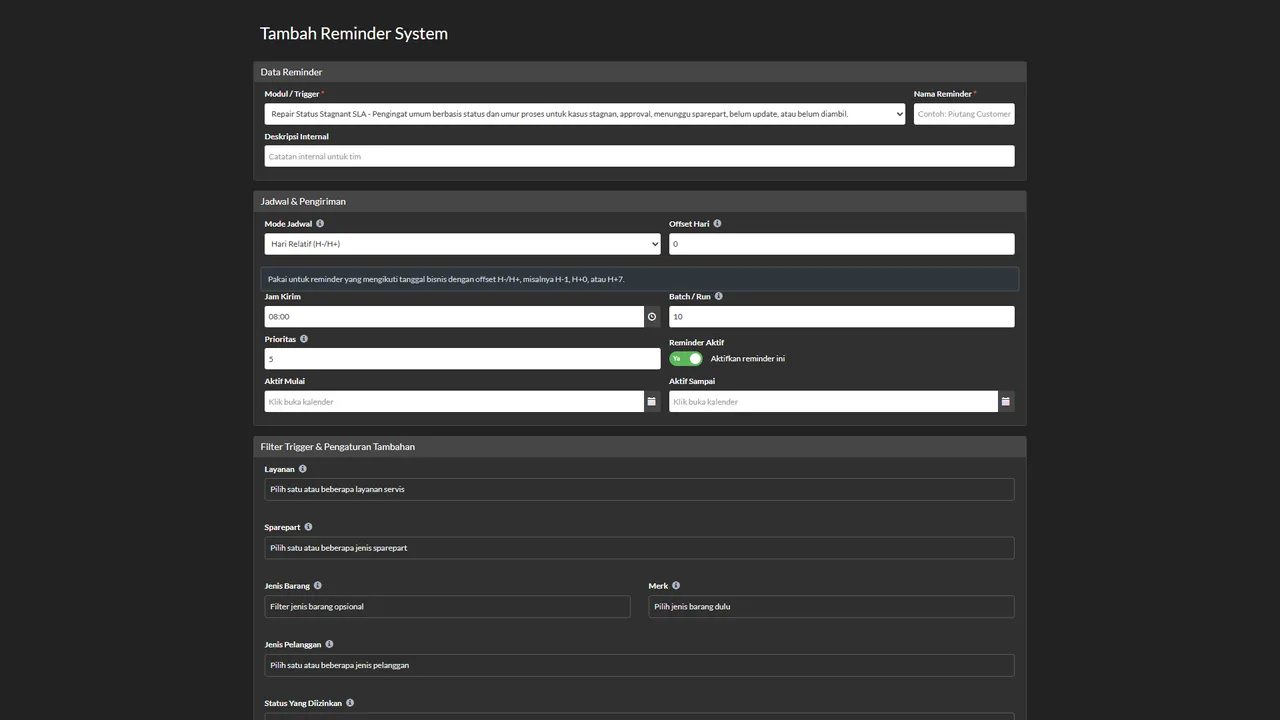
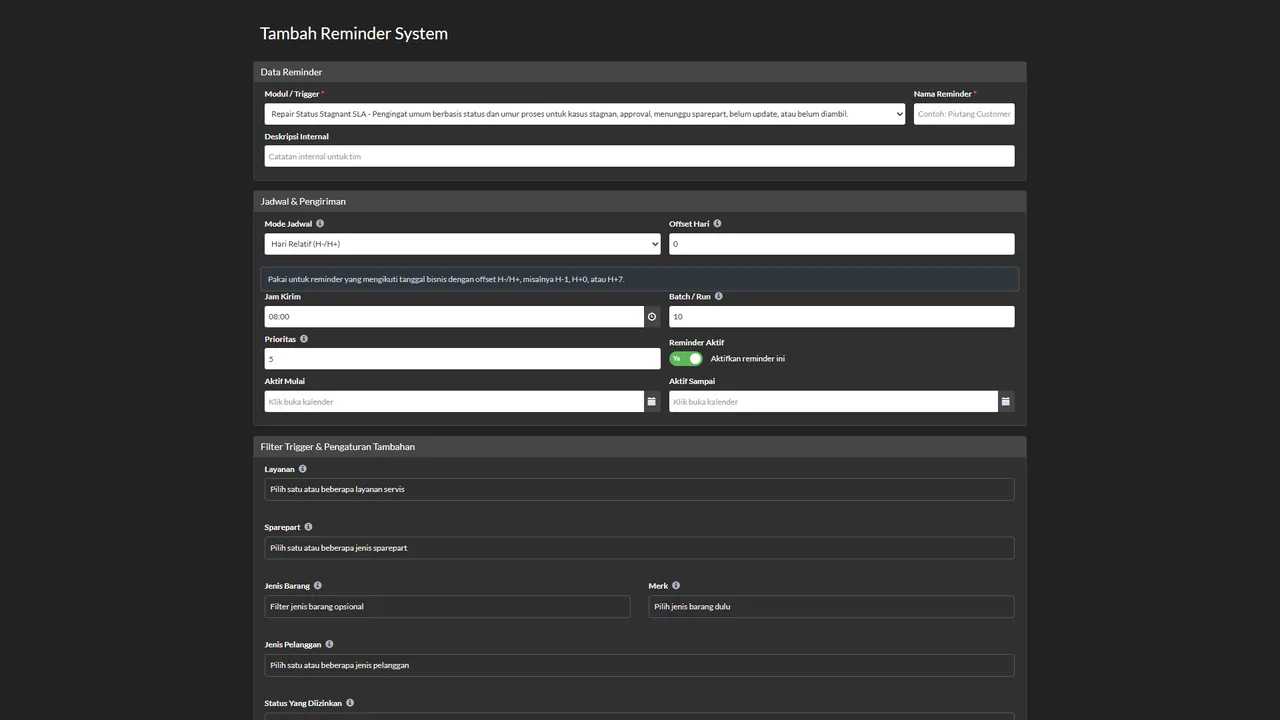
From the Alat → Pengingat menu, you can configure rules that monitor invoice due dates, warranty expirations, and repair jobs that remain stalled in one stage for too long without progress. Once your scheduled trigger condition arrives, the system sends WhatsApp messages automatically without requiring any team member to open customer lists or tap send buttons manually. You can follow complete step-by-step instructions in the automatic reminder system tutorial.
Configuring triggers, sending hours, and recipient filters
The Automan reminder engine provides dozens of built-in triggers organized around practical repair shop and workshop workflows:
- Finance and receivables: Automatic reminders for overdue customer invoices, repair tickets collected without full payment, pending down payment settlements, installment deadlines, and supplier payables.
- Repairs and customer care: Follow-up messages several days after a device is collected, reminders before a repair warranty ends, and alerts whenever an active job stays stagnant in one status too long.
- Inventory monitoring: Automated alerts delivered directly to the manager’s phone when spare part quantities drop below reorder thresholds, inventory sits dormant, or stock counts turn negative.
- Daily operational summaries: End-of-day recaps covering sales totals, completed repairs, and daily cash flow delivered straight to the shop owner’s personal WhatsApp number every evening.
Every reminder rule includes Mode Jadwal (schedule mode), Offset Hari (day offset), and Jam Kirim (sending hour). Day offsets allow you to dispatch messages ahead of an event (such as three days before a repair warranty ends) or afterwards (such as two days after device pickup). Setting a designated sending hour ensures notifications only go out during sensible business hours, avoiding disruptive late-night pings. Recipient routing is equally adaptable: messages can be directed to the customer, the parts supplier, the assigned technician, involved staff members, or any specific phone number you enter.
Personal messages with dynamic masking tags
Automated reminders frequently get ignored when they sound like generic robotic broadcasts. Automan solves this by providing variable masking tags in message templates, which automatically transform into accurate transaction details when sent.
You can insert tags for customer names, repair ticket numbers, device models, outstanding balances, and due dates directly into the message text. As a result, the customer receives a polite, professional note that feels written personally by shop staff. Additional techniques for managing messaging templates are explained in the advanced WhatsApp features tutorial.
Tightly integrated with repair workflows and the till
Automated Reminders runs directly on the operational records already maintained inside Automan. You never need to duplicate customer contacts or record repair dates in third-party calendars. Units processed through the repair management feature or receipts generated at the counter immediately become live reference points for the reminder system.
To deliver messages, your shop needs an active shop WhatsApp connection configured in settings. Because messages are transmitted through your own store number, customers can reply directly to the WhatsApp chat to ask questions, request extensions, or confirm their pickup schedule.
Start small with overdue receivables
You do not need to activate every reminder trigger at once. The most sensible way to begin is by enabling reminders that directly protect your shop’s cash flow: overdue receivables and collection alerts for completed repairs. Observe how they perform over a few business days, ensure your sending hours match your shop schedule, and then gradually introduce warranty notifications and inventory warnings.
Automated Reminders and Store WhatsApp are paid add-on modules — details can be found on the pricing page. You can also explore the software interface firsthand on our demo page to see how Automan keeps everyday shop operations running smoothly.
What it needs first — and what happens if you switch it off
Automated Reminders requires the Store WhatsApp (CRM) module to be active with your shop WhatsApp number connected under Pengaturan → WA Gateway, as every reminder is sent via WhatsApp. If the module is disabled: the Alat → Pengingat menu is locked and refuses to open. Existing rules cannot be viewed, edited, or stopped, and new reminders cannot be created. Rules already active are not deleted and do not stop automatically — switch off unwanted rules while the menu is still accessible.
FAQ
Does automated messaging require a separate WhatsApp number?
What prevents the system from sending duplicate reminder messages?
Is Automated Reminders a paid add-on module?
Can reminders accidentally go out late at night and disturb customers?
What happens to existing reminder rules if the module is switched off?
Related reading
- Tutorial
Create automatic reminders in WhatsApp
Step-by-step guide to setting up reminder rules, triggers, hours, and masking.
- Tutorial
Set up automated messages and WhatsApp replies
Configure automated status templates, incoming chat responses, and fast replies.
- Feature
Shop WhatsApp
Shop WhatsApp integration for automatic repair updates and digital receipts.
- Feature
Repair Management
Core repair intake and workshop tracking connected to reminder schedules.
Already know the problem?
See the workflow demo that matches it.