

Queue Screen
A Calm Waiting Room Free From "Is It Ready Yet?"
Waiting customers who sit in the dark often walk up to the service counter asking if their unit is finished. This queue screen puts real-time repair progress on your waiting-room TV alongside voice announcements when jobs are done.
- Web
Free to start · no credit card
How it works
From first use to everyday habit.
-
Open queue display on your screen
Launch any web browser on your smart TV, tablet, or spare monitor and open the Queue Screen address.
-
Choose display layout and refresh gap
Pick from four screen arrangements and six color presets, then set your auto-refresh interval between ten and sixty seconds.
-
Turn on voice calls and announcements
Enable automated voice call-outs to announce completed tickets and run custom store announcements across the bottom ticker.
-
Let the screen run automatically
The board updates itself as technicians log progress in the workshop without anyone touching the display.
What it does
Three live repair columns
Show units currently in progress, next items in line, and repairs already completed today in real time.
Automated voice call narrator
Hear customer names announced out loud the moment technicians mark repairs complete without counter staff calling manually.
Hands-free automatic updates
The queue board refreshes itself automatically every few seconds directly from updates entered by repair staff.
Scrolling announcement ticker
Broadcast shop announcements, operating hours, and active service promotions right at the bottom of the TV screen.
Integrated YouTube background playback
Stream videos, playlists, or ambient music from YouTube links to keep your waiting area lively and engaging.
Customisable colour themes
Pick from ready themes or customize screen colours to match your interior and keep text readable across the room.
The full picture
Sitting in an uncertain waiting room is an exhausting experience for any customer. In a phone repair shop or auto workshop, twenty quiet minutes without updates feels like hours. Customers grow restless, glance toward the workbench, and eventually walk up to the counter asking if their turn is close. This routine interruption repeats dozens of times a day, breaking your team’s concentration.
The constant interruptions breaking your technicians’ focus
When waiting customers have no visibility into repair progress, they seek assurance at the front counter. Questions like “is it ready yet?” or “how much longer?” do not stem from impatience. They arise simply because there is no visual indicator to consult while waiting.
For counter staff and repair technicians, these inquiries create hidden operational friction. A technician soldering delicate circuits or assembling engine parts must put down their tools just to look up a ticket number. Front desk staff who should be handling check-ins or processing payments get held up answering the same status questions over and over.
A silent waiting room magnifies the tension. Without clear information on display, customers assume their repair is forgotten, while technicians feel constantly watched and pressured.
Three live columns that turn waiting anxiety into transparency
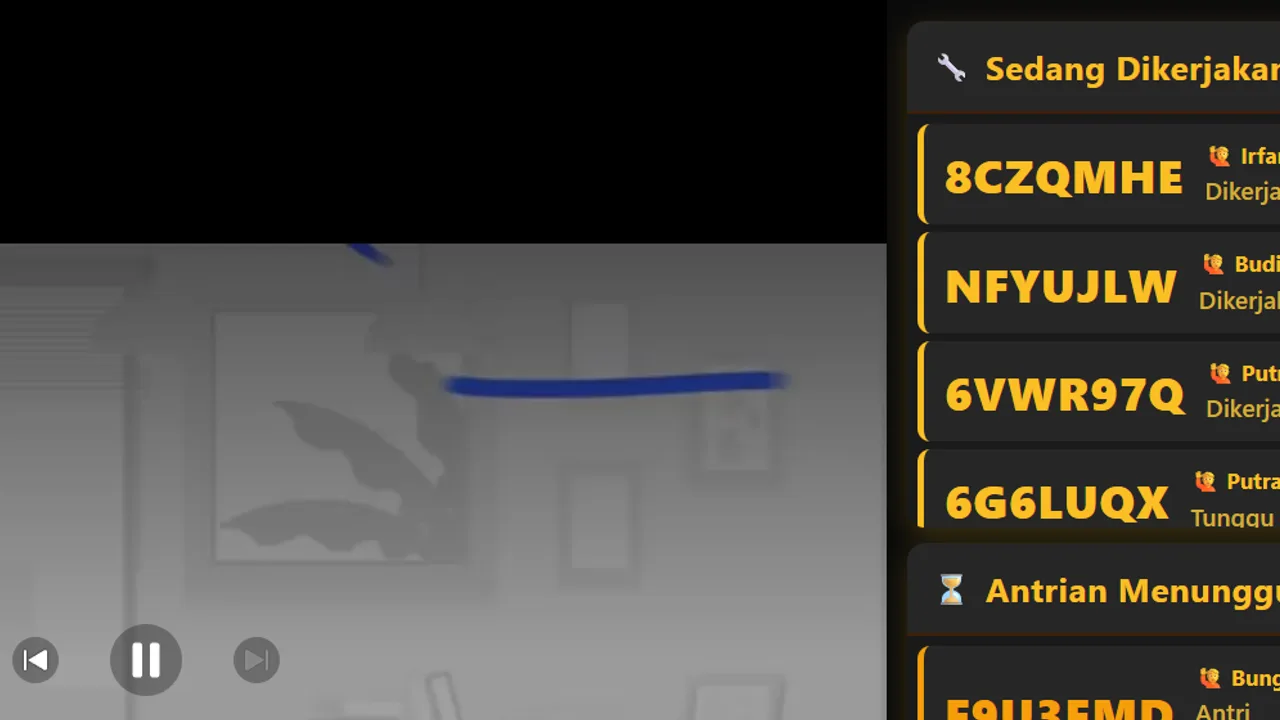
Automan resolves this communication gap by presenting a live queue screen in your waiting room via the Server → Layar Antrian display view. The board displays three essential job lists side by side:
- In Progress: displays items currently handled on the bench along with customer names and assigned technicians.
- Waiting in Line: lists upcoming checked-in repairs queued up in arrival order.
- Completed Today: highlights finished repairs ready for pickup and invoice settlement at the counter.
None of this requires separate data entry. The display screen reads live ticket status changes directly from your repair management workflow. Whenever technicians update job progress in the workshop, the waiting-room board reflects those updates automatically on its next refresh cycle.
Voice call narrator: reaching customers glued to their phones
Mounting a screen on the wall does not always solve the problem on its own. Most customers in a waiting area sit looking down at their phone screens. They rarely watch the TV screen long enough to catch rolling line items.
That is why Automan pairs visual information with automated voice call-outs. The system speaks announcements during key repair moments: when a new job joins the queue, when bench work starts, or when a repair is marked complete.
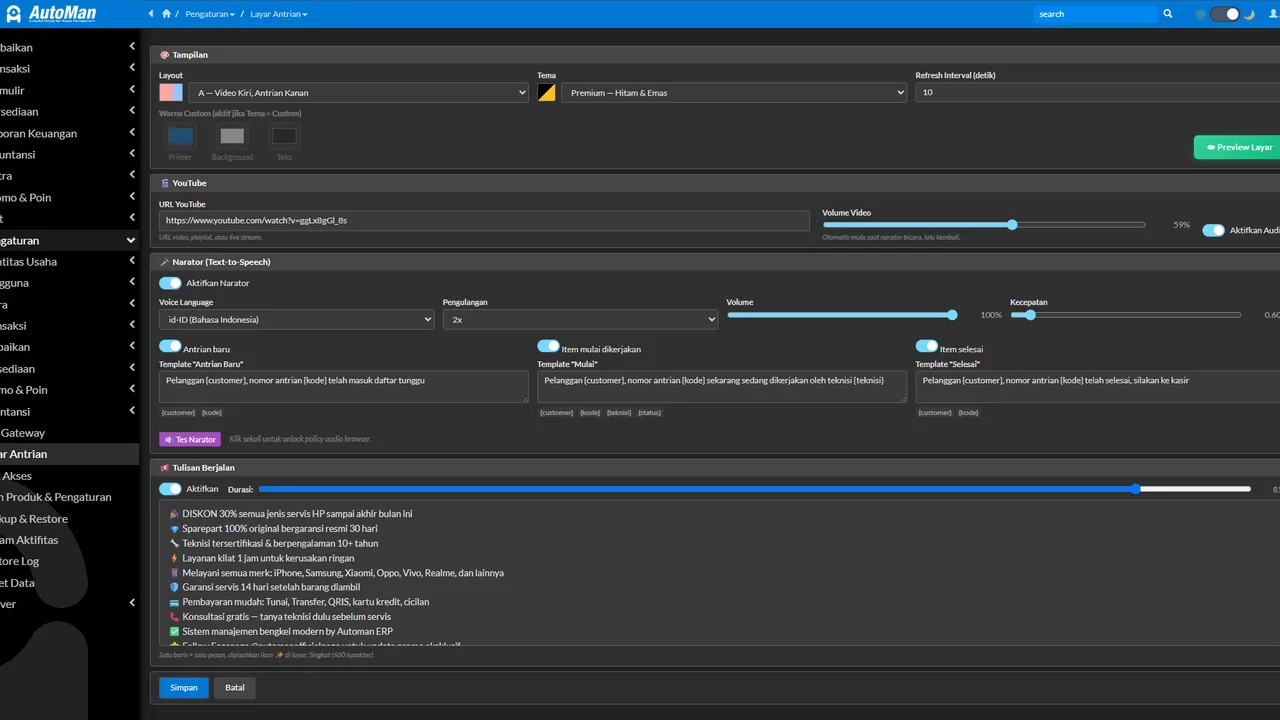
You have total freedom to customize the spoken phrasing templates through Pengaturan → Layar Antrian (the app settings are in Indonesian). You can select the voice language, speech speed, audio volume, and repetition counts. A built-in voice test button lets you preview exactly how the announcement sounds before it ever plays in front of real customers.
Background entertainment, announcement ticker, and flexible layouts
To prevent your waiting area from feeling quiet and sterile, the queue screen can stream video directly from YouTube URLs. You can embed instructional clips, ambient music playlists, or promotional store broadcasts. Video volume controls remain completely independent from narrator volume, ensuring customer call-outs remain crisp and audible above background audio.
At the bottom of the screen, a scrolling text marquee broadcasts store announcements. Use it to share shop contact details, holiday hours, warranty policies, or current promotional packages.
Automan includes four display layouts and six preconfigured color themes. You can also define custom background, accent, and text colors. This flexibility guarantees that names and ticket details stay sharp and readable from the furthest seat in the room.
Modest hardware, customer privacy, and tangible shop benefits
Setting up a waiting-room screen does not require expensive commercial display hardware. Automan’s display runs inside standard web browsers. You can easily use:
- An existing smart TV in your waiting area equipped with a built-in web browser.
- A repurposed computer monitor connected to a cash register PC or spare laptop.
- A wide-screen tablet propped neatly on the front intake counter.
Simply launch the browser on your screen, navigate to your shop’s display URL, and enter full-screen mode. For customers who prefer to leave the premises while waiting, pair this setup with repair status tracking and QR labels so they can check progress right from their mobile phones.
Getting started with your waiting-room display
A live queue screen elevates your shop into a professional, transparent service environment. Your technicians work uninterrupted without repetitive inquiries, while customers sit relaxed knowing their repair progress is clearly displayed.
The Waiting-Room Queue Screen is a paid add-on module — details on our pricing page. You can follow the step-by-step setup and sound testing instructions in the customer queue display tutorial. You can also test drive the complete repair workflow in our interactive Automan demo.
Hardware requirements and operational details
The queue screen pulls live job data directly from active repair orders. This module is a paid add-on — details on the Pricing page. Voice call-outs, YouTube video playback, and the scrolling announcement ticker only appear once enabled under Pengaturan → Layar Antrian (the app menus are in Indonesian). Video playback requires a YouTube link as local video files cannot be uploaded. Please note that customer and technician names appear on screen, and customer names are spoken aloud by the voice narrator, so consider screen positioning carefully. If the module is turned off, the Server → Layar Antrian display stops showing active tickets, but all saved configuration settings remain intact.
FAQ
Do I need dedicated display hardware or special commercial screens?
How does the voice narrator announce customer turns?
Can I upload custom video files directly instead of YouTube?
Is the Queue Screen module included for free?
How should I manage customer name privacy on a public waiting-room screen?
Related reading
- Tutorial
Show the repair queue on TV
Step-by-step setup for waiting-room screens, color themes, and voice testing.
- Feature
Repair Management
Check-in workflows, technician assignments, and live job status tracking.
- Feature
Repair Tracking & QR Labels
Allow offsite customers to check repair status on their phone via QR code.
- Feature
Shop WhatsApp
Automate WhatsApp messages when repairs are completed and ready for pickup.
Already know the problem?
See the workflow demo that matches it.