

Online Forms
Let Customers Fill in the Details, Follow Up Without Retyping
Customer inquiries on chat apps get buried quickly when the repair counter is busy, and details taken by phone often get jotted down incorrectly. Dedicated online forms let clients enter their own information, sending clean submissions straight into your status board without staff retyping.
- Web
Free to start · no credit card
How it works
From first use to everyday habit.
-
Create project and form link
Name the form and set a clean, human-readable URL slug that you can share across social media and ads.
-
Configure custom form fields
Add text, numbers, dates, dropdown options, file uploads, or signatures matching the data your team needs.
-
Set security and WhatsApp updates
Enable anti-bot verification and write custom message templates that fire automatically at specific stages.
-
Manage entries on status boards
Track incoming submissions, update their operational status with notes, and maintain a complete audit history.
What it does
Custom Field Builder
Collect text, dates, dropdowns, damage photos, digital signatures, and ratings with tailored input constraints.
Automatic WhatsApp Alerts
Send automated status messages to customer phone numbers whenever submissions are received or moved forward.
Anti-Bot Spam Protection
Block automated spam entries to ensure your inbox only contains genuine service inquiries and repair requests.
Automated Promo Coupons
Generate instant coupon codes for customers who submit the form to encourage faster service booking decisions.
Ad Conversion Tracking
Connect advertising tracking pixels to measure how many campaign visitors actually complete and submit your form.
Export and Print Records
Inspect individual submissions, print workshop job cards, or export form records whenever you need them.
The full picture
How many potential repair jobs slip away simply because customer inquiries get buried during peak workshop hours? Messages asking about battery replacement costs or doorstep pickup availability often arrive right when technicians are focused on bench repairs. By the time someone replies a few hours later, the customer has already reached out to another shop.
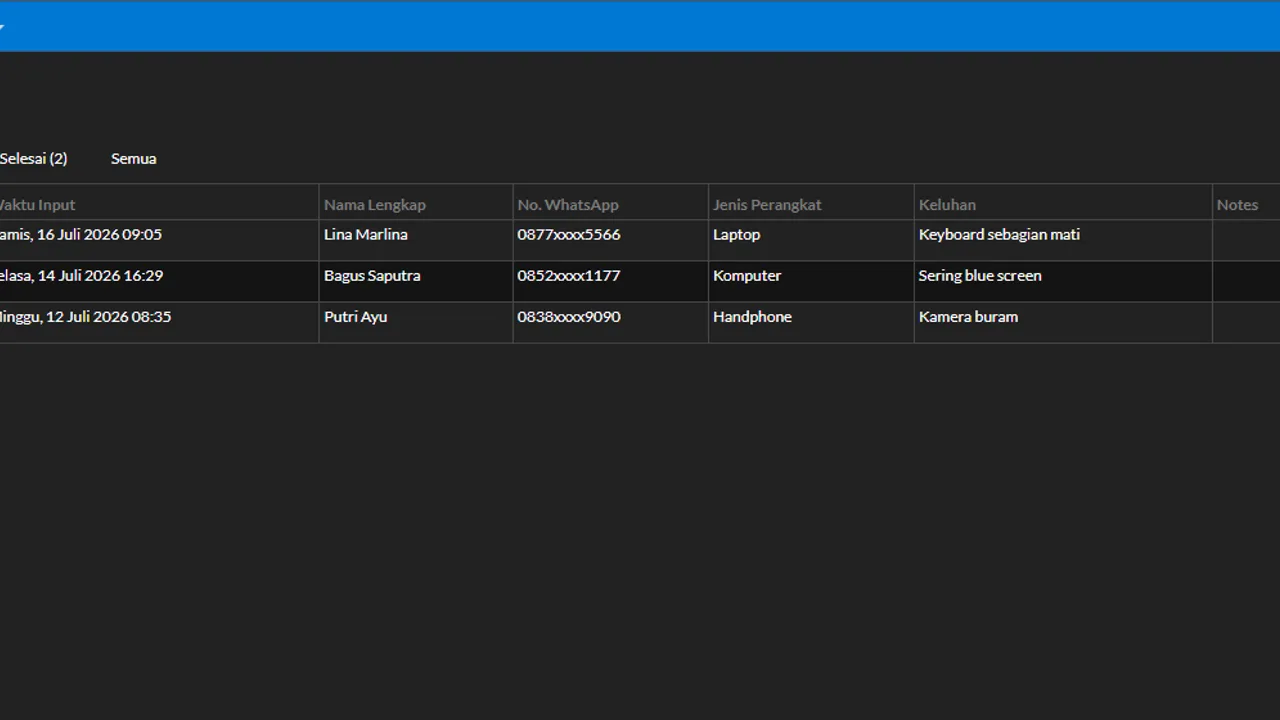
Dedicated online forms eliminate these communication bottlenecks from the start. Clients click a shared link, choose their service requirements, and enter their contact information directly. The moment they submit, all details flow into your shop application neatly organized, sparing your staff from retyping notes taken from chat apps.
Customer messages slip away during peak shop hours
A familiar scenario plays out in service centres and workshops daily. A potential customer reaches out through social media or private messaging, staff scribble their device details on a paper memo, and the note gets misplaced near the counter. When the customer calls back to confirm their pickup schedule or warranty claim, nobody remembers who took the initial request.
Manual intake of this kind wastes valuable workshop hours and introduces preventable errors in phone numbers or delivery addresses. Worse yet, qualified repair leads that are ready to pay walk away because follow-up responses came too late.
Distributing online form links solves intake errors at the source. Customers provide their exact phone number, device model, fault symptoms, and condition photos themselves, ensuring that your team always works with reliable, firsthand information.
Let customers submit details via dedicated links
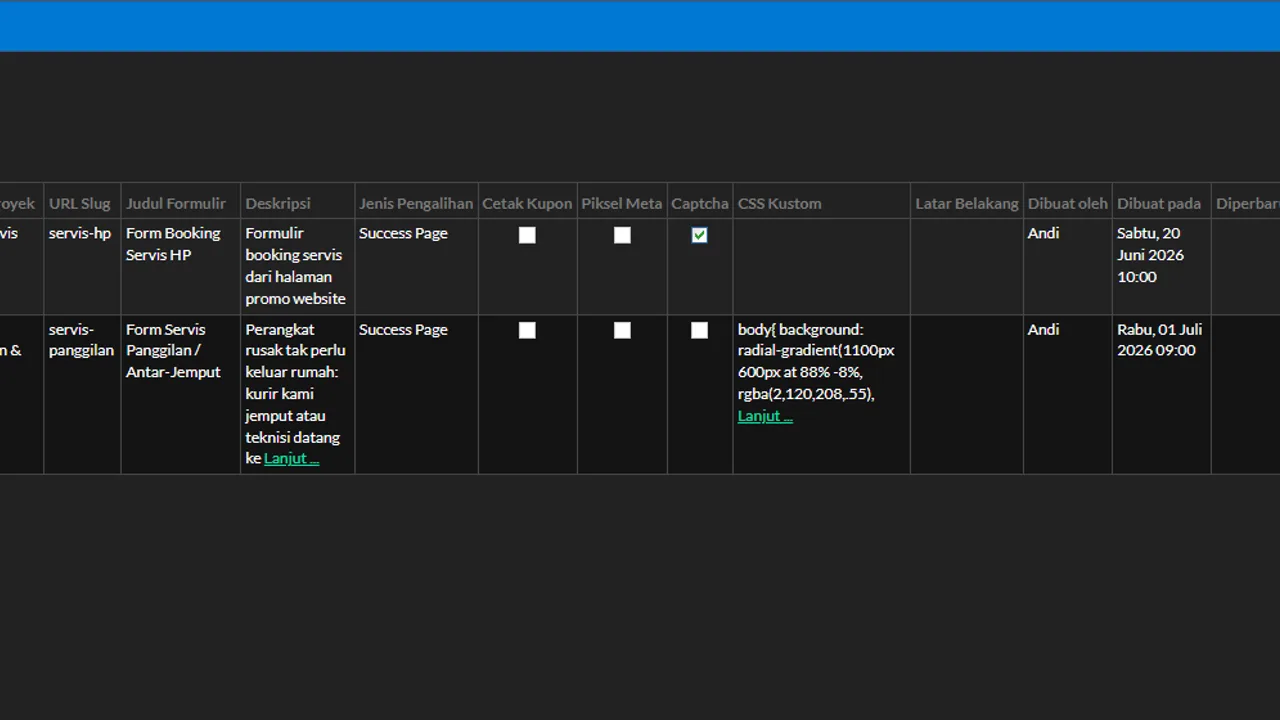
From the Formulir → Proyek menu, you can build branded submission pages with clean, human-readable web addresses. You can place these links in your social media profiles, include them in automated chat greetings, or send them directly to clients requesting mobile repair visits.
Forms can be tailored to various front-office needs:
- Onsite repair bookings and device pickup requests.
- Warranty repair claims requiring uploaded receipt photos and fault descriptions.
- Initial repair inquiries for laptops, smartphones, or workshop vehicles.
- Customer interest lists for incoming spare parts or refurbished devices.
Every form project automatically generates its own submission view inside the software, allowing staff to manage inquiries separately without cluttering records from other campaigns. You can explore the full setup sequence in our repair shop lead forms tutorial.
Visual status boards: give every request clear accountability
Collecting contact details is only the first step; following through reliably is what secures customer loyalty. Automan organizes incoming entries onto visual status boards configured around your specific shop routines.
For example, a doorstep repair intake form can progress through clear operational stages: Request Received, Scheduled, Device Collected, and Completed. Whenever an employee advances an entry to the next column, the system records the change alongside operational notes and the user account responsible.
With structured status columns, no repair request gets abandoned in an overflowing inbox. Shop owners can see at a glance how many inquiries await follow-up and how many have successfully converted into billed repair tickets.
Automatic WhatsApp alerts without manual typing
What elevates Automan online forms above generic survey tools is direct integration with messaging workflows. When your shop enables the WhatsApp for repair shops module and includes a phone number field on the form, confirmation messages dispatch automatically to the customer.
You can compose unique message templates for each workflow stage. When an inquiry first arrives, the customer receives an immediate text confirming that their request is safely registered. Once staff move the ticket to Scheduled, a second notification sends out the confirmed technician arrival window.
Automated alerts save your front desk from typing repetitive status messages while reassuring clients that their repair inquiries are receiving professional attention.
Flexible field design, spam defense, and ad tracking
Every repair specialty requires different technical details. Automan provides a versatile field builder including short text, numbers, booking dates, dropdown choices, digital signature capture, and star ratings. You can also add file upload fields so customers can attach photos of cracked screens or water damage.
To safeguard your queue against automated spam, each form supports anti-bot verification keys. If you invest in digital marketing campaigns, you can embed advertising tracking pixels directly into form projects to evaluate campaign return on investment, matching the reporting tools in our customer acquisition tools suite. You can also activate promotional coupon codes handed to visitors immediately upon form submission.
Collected entries can be reviewed individually, printed out as physical workshop job cards, or exported into spreadsheet files for accounting audits.
Who benefits most and how to get started
Online forms are designed for phone repair centres, electronics technicians, and automotive garages handling inquiries beyond walk-in counter foot traffic. Owners actively marketing across social channels or offering mobile technician visits will save substantial daily administration time.
Online Forms is a paid add-on module — details can be found on our pricing page. You can subscribe for the durations your business requires, while core Automan accounts can be started on our free Lite plan. You can also link forms to your shop website builder to build a credible digital storefront.
Test this workflow firsthand in the Automan interactive demo or launch your first customer intake form today to keep every repair lead organized.
Operational dependencies and module deactivation
Creating and sharing forms works without extra dependencies. Automated WhatsApp messaging requires an active WhatsApp connection and a phone number field on the form, while anti-bot protection requires your own verification keys. When the module is disabled, form projects and submissions cannot be accessed, existing data and status logs cannot be updated or printed, and automated messaging stops.
FAQ
What types of fields can I include in a form?
How do automated WhatsApp updates work?
Is Online Forms a paid add-on?
What happens to submitted data if the module is disabled?
How do I prevent spam and automated bot submissions?
Related reading
- Tutorial
Create an online form for potential customers
Step-by-step guide to creating forms, configuring tracking pixels, and managing status boards.
- Feature
Customer Acquisition Tools
Track lead sources, evaluate advertising channels, and convert repair inquiries.
- Feature
Shop WhatsApp Integration
Automate customer messaging and dispatch repair status updates directly to phone numbers.
- Feature
Shop Website Builder
Showcase services and spare parts with a dedicated website on your own domain.
Already know the problem?
See the workflow demo that matches it.