

Purchasing & Suppliers
Restock Without Guessing Costs, Keep Supplier Debts in Plain View
Every parts delivery is logged cleanly: stock updates by itself, unit cost and shipping fees are allocated fairly, and supplier payment due dates stay in plain sight without lost paper receipts.
- Web
- Android app
Free to start · no credit card
How it works
From first use to everyday habit.
-
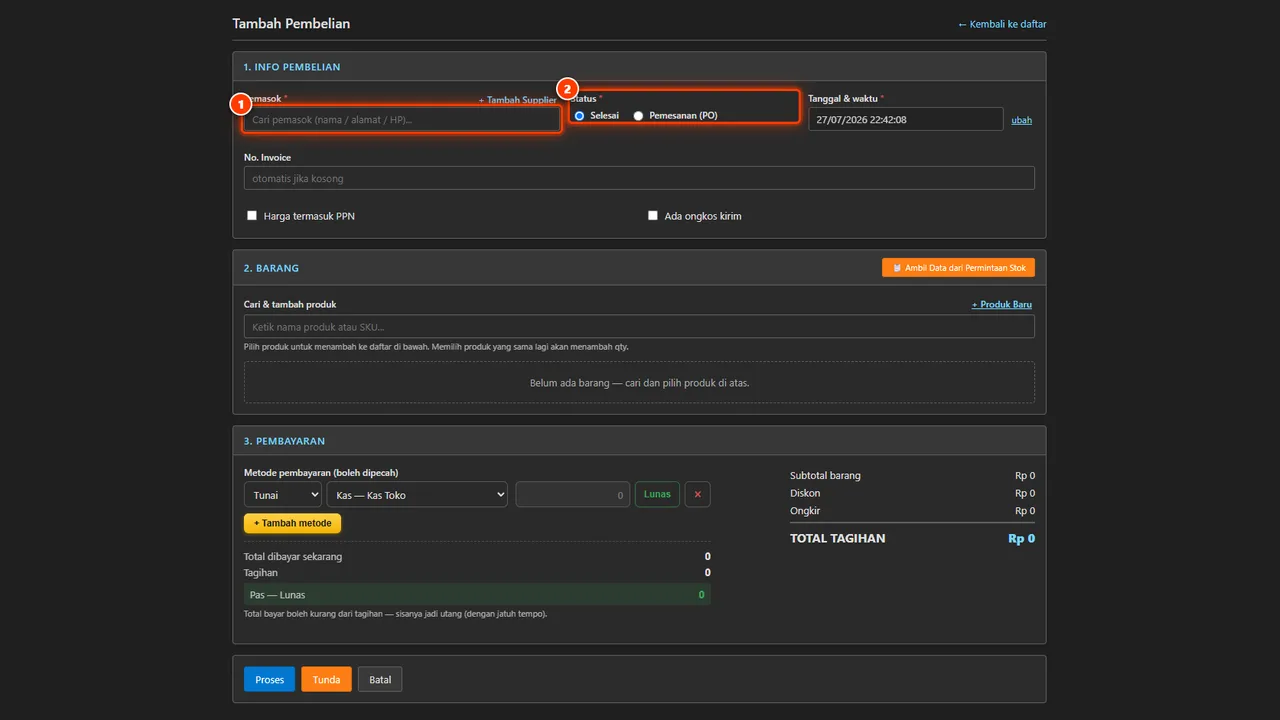
Select supplier and parts
Choose regular wholesalers and search parts instantly, or use quick-add buttons without leaving the transaction page.
-
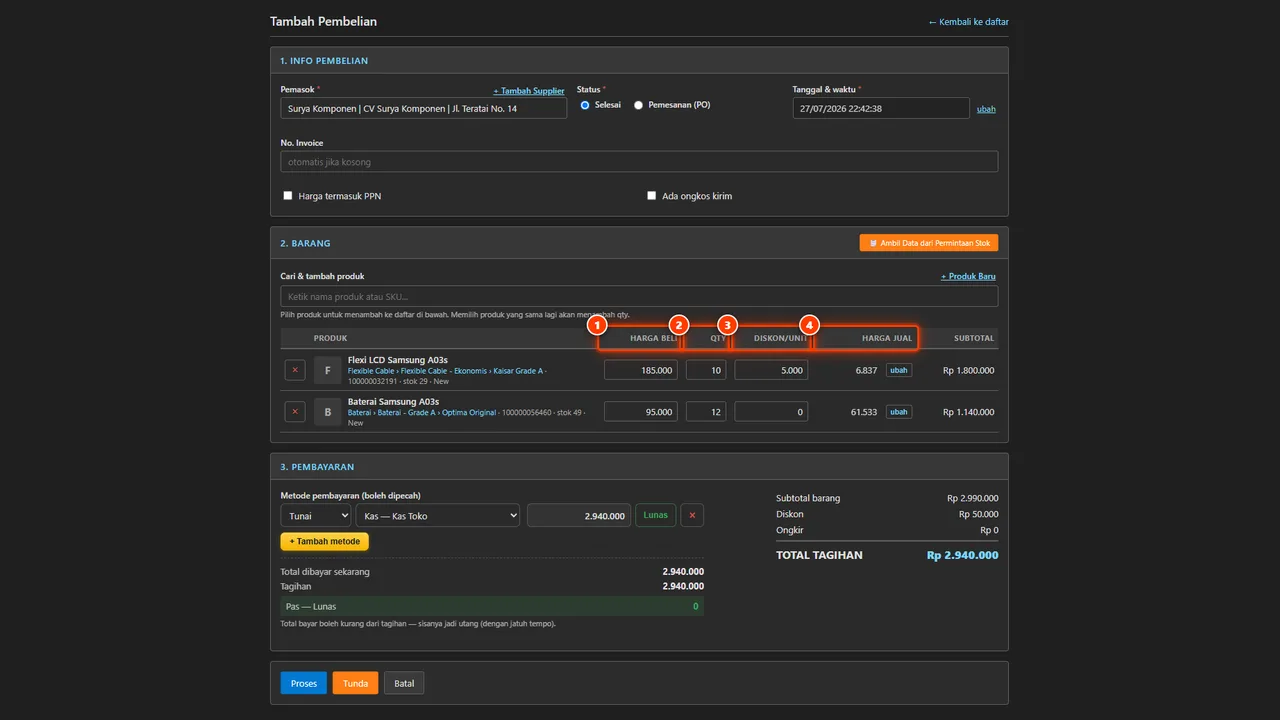
Enter quantity, cost, and freight
Input delivered quantities, check past buying price history, and allocate shipping costs to item unit costs.
-
Set payment and credit terms
Select immediate cash, bank transfers, split payments across accounts, or credit terms with clear due dates.
-
Process invoice and post stock
Hit Process to update inventory batch records immediately and reflect open payables across financial reports.
What it does
Buying Price History
Compare previous supplier purchase rates while filling invoices so you never overpay during restocks.
Batch Stock Inflow
Update inventory counts and actual cost prices automatically once purchase invoices are processed.
Credit Terms & Installments
Track outstanding supplier debts and due dates per vendor to keep workshop cash flow predictable.
Returns & Warranty Claims
Send defective parts back with links to original invoices, choosing unit swaps or payable deductions.
Restock Logging on Mobile
Record restock purchases directly at wholesale markets using the Android app without waiting to return.
Freight Cost Allocation
Distribute delivery expenses across line items so your unit product cost remains honest and transparent.
The full picture
A cardboard box of spare parts lands at your workshop counter, the paper invoice is stuffed under the cash drawer, and the components go straight onto the shelf. Everything looks finished until the end of the month, when cash profits do not match the busy front counter. Automan Purchasing and Supplier management ensures every restock delivery is recorded completely: stock increases automatically, cost prices stay honest, and supplier payment balances remain clearly visible.
Restocking parts on scrap paper costs more than you think
In many electronics repair shops and auto garages, restocking runs entirely on personal memory. Wholesaler receipts sit inside folders, while replacement components are immediately consumed by technicians to finish customer repair jobs.
When buying prices never enter the management system, cost calculations go blind. Front-counter reports may show healthy margins, but those numbers ignore delivery fees and wholesale price spikes.
Credit terms create a second blind spot. Wholesalers demand payment weeks later, but physical receipts are missing or mismatched against what was actually delivered. Meanwhile, defective components that should be sent back under warranty sit abandoned in a workshop corner because original purchase proofs cannot be found.
Turning vendor invoices into honest stock and accurate cost prices
In Automan, restock intake is recorded under the Transaksi → Pembelian → List menu (available in Indonesian interface terminology). The form is streamlined so staff never hesitate to log incoming shipments.
Whenever you restock from a wholesaler or buy parts not yet cataloged in the system, you do not need to cancel the draft or switch screens. Quick-add buttons right beside the fields let you create supplier records and new catalog items without leaving the transaction screen.
True unit cost prices are calculated accurately through freight allocation. Shipping expenses per invoice can be allocated to line items using the allocation method you choose, ensuring cost of goods sold reflects real workshop spending.
In addition, hovering or focusing on the buying price field immediately reveals previous buying price history, showing past dates and vendor names. You can verify whether a distributor has raised or lowered their rate before accepting the delivery. Follow the step-by-step walkthrough in the recording parts purchases tutorial.
Managing credit terms, split payments, and shopping on the phone
Not every parts run is paid in full on the spot. Automan supports credit terms, upfront cash, bank transfers, and split payments combining multiple payment pockets.
When recording a deferred purchase, you simply specify the due date. The system automatically maintains gross billing, amount paid, and the remaining debt balance. Upcoming supplier payment schedules can be reviewed each morning using the guide in the settling supplier debts tutorial.
For workshop owners who personally visit wholesale supply markets, logging invoices does not have to wait until you return to your shop desk. Using the Automan Mobile Android app, restock bills and supplier details can be entered on the spot right from your smartphone.
If suppliers fulfill purchase orders in partial shipments, you simply record the quantity received today. Remaining quantities arriving later can be received straight from the purchase list without altering closed historical invoices.
Vendor warranty returns: stop writing off defective parts as shop losses
Factory-defective parts should never turn into shop losses. Automan provides a structured return flow under Transaksi → Pembelian → Retur to claim vendor warranties.
Each purchase return references the original restock invoice. For items tracked by serial number or IMEI, you can select exactly which unique serials to void, ensuring the precise physical unit is accounted for. Detailed steps are covered in the purchase returns and supplier claims tutorial.
Supplier compensation can be resolved according to your vendor agreement:
- Product replacements swapping defective stock for identical units.
- Cash refunds returning funds straight into your shop cash pocket.
- Payable deductions lowering outstanding debt balances without moving physical money.
All purchasing activities are summarized under Transaksi → Pembelian → Laporan. Store owners can inspect 12-month trend charts alongside four core indicators: Total Invoiced, Total Paid, Total Returns, and Outstanding Debt. Discover how to interpret these figures in the purchase reports tutorial.
What changes from the owner’s chair
Accurate net profit figures. Because every part carries verified unit costs and freight allocations recorded in spare parts inventory, financial statements reflect true gross margins rather than guesswork.
Predictable cash flow. Supplier due dates are tracked cleanly, helping your shop avoid missed deadlines or strained vendor relationships.
Centralized vendor directories. Bank accounts, digital wallets, WhatsApp contacts, and product categories for each wholesaler are stored under the Mitra menu, allowing any purchasing staff member to handle transfers without repeatedly asking for payment numbers.
Bring clarity to your supplier purchasing today
Supplier Records and Purchasing from Suppliers are included without extra fees in the Automan platform. You can activate both in system settings and record your first restock invoice today.
Curious to experience restock workflows and inventory cards firsthand? Visit the Automan interactive demo to try out the system, or check plan options on the pricing page.
Prerequisites and what happens if disabled
Recording a purchase requires selecting a supplier on every invoice and choosing items from your product catalog, though both can be added instantly using quick-add inside the form. If disabled: the Purchase, Return, and Supplier menus become inaccessible, incoming stock no longer updates automatically, supplier purchase price history stops tracking, purchase orders (PO) cannot be generated, and supplier debts and returns must be handled outside the app. Existing records remain safe and become readable again once the modules are re-enabled.
FAQ
Are the Purchasing and Supplier modules paid add-ons?
When does received stock enter inventory?
How does Automan manage unpaid or deferred purchases?
Do I have to register suppliers and products before recording restocks?
How do I claim warranty for defective parts from suppliers?
Related reading
- Tutorial
Enter parts purchases from a supplier
Complete guide to recording restock invoices, freight allocation, and quick-add.
- Tutorial
Read your shop purchase report
Monitor supplier payables, return summaries, and 12-month purchasing trends.
- Tutorial
Claim damaged items from a supplier
Turn defective workshop spare parts into formal supplier warranty claims.
- Tutorial
Settle payables and collect customer receivables
Record installments and full settlements against purchase invoices by due date.
- Feature
Spare Parts Inventory
Track workshop stock, cost batches, and serial number movements.
Already know the problem?
See the workflow demo that matches it.