

Business Analytics
Know What Sells, Who Spends, and Where Your Real Profit Comes From
Receipt piles show how much money landed in the drawer today, but they never explain why certain repairs slowed down or which inventory drained cash. Automan Analytics unifies eight operational views so you make decisions backed by verifiable figures.
- Web
- Android app
Free to start · no credit card
How it works
From first use to everyday habit.
-
Open the menu and set dates
Select the analytics view you need and apply the date range once at the top to sync every card, chart, and table.
-
Follow direction on Trend tabs
Follow day-to-day direction on the Trend tab, then compare two date ranges on the Period tab.
-
Check top performers in Rankings
Identify your most productive technicians, frequent device brands, recurring repair symptoms, and top-moving stock.
-
Dissect profit in the Breakdown tab
Filter performance by item, cashier, customer, or payment method across six standardized metrics.
What it does
Live Updates Without Refreshing
Watch pending jobs, bottlenecked stages, and today revenue update automatically whenever incoming repairs or sales land.
Comprehensive Repair Evaluation
Spot breakdown-prone brands, common fault types, and technician completion rates without distorting realized revenue figures.
Stock Velocity and Dead Inventory
Track fast-moving spare parts and uncover idle shelves before slow stock locks up your operating capital for months.
Six Standardized Margin Metrics
Compare quantity, revenue, discount, cost, profit, and percentage margin fairly across items, cashiers, customers, and payment methods.
Staff Output and Cashier Auditing
Measure true employee contributions through completed jobs, repair revenue, turnaround times, and total discounts surrendered at the till.
Seamless Web and Android Access
Open all eight analytics areas from counter computers or the mobile app across single shops and multi-branch networks.
The full picture
At the end of every shift the till prints a daily summary, showing cash collected across the counter. Yet that pile of receipts never explains why laptop repairs dropped this week, which spare parts are tying up operating cash on the shelves, or which cashier surrenders discounts too easily. Automan Business Analytics answers the operational questions that formal bookkeeping leaves behind: pinpointing what sells, who returns, and which technicians generate genuine gross profit for your repair shop or automotive workshop.
Raw receipts count revenue, not the reasons behind it
Traditional bookkeeping and financial reports are designed to track settled balances: monthly profit, cash reserves, and balance sheets. They answer how much, but they never explain why. You might see monthly profit dip ten percent, but you cannot tell whether that drop came from slower screen repairs, prolonged technician turnaround, or costly replacement parts broken during installation.
When restocking decisions or workstation assignments rely purely on personal recollection, repair shops quietly bleed margin. Human memory tends to focus on difficult jobs or demanding customers, even though brisk ten-minute repairs often generate the bulk of everyday store revenue.
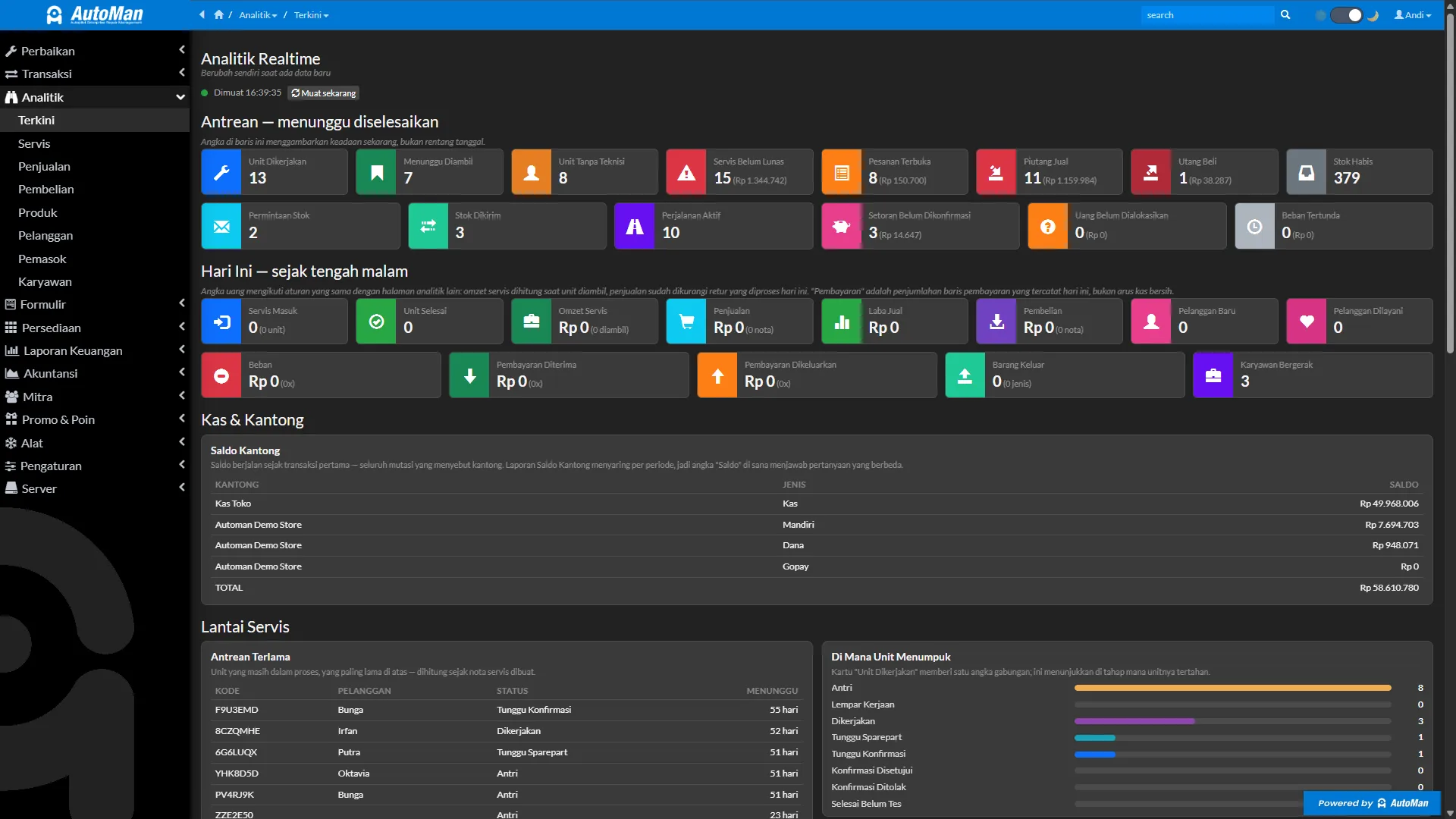
Automan Business Analytics extracts raw operational entries directly from repair management and counter sales. All figures consolidate across eight focused operational areas without requiring manual invoice tallying.
Live Analytics: track store pulse without pressing refresh
When monitoring the service reception or the workshop floor, you need live information that reflects what is happening right now. The Live Analytics screen is intentionally built without confusing date filters. It maintains only two clear timeframes: the current active state and cumulative progress since midnight.
The queue section highlights pending workshop jobs: units dismantled at workbenches, devices awaiting customer quotes, finished repairs ready for pickup, and unsettled sales invoices. Below that, the workshop floor panel pinpoints where repair units bottleneck and flags the oldest unresolved tickets so no customer device sits neglected.
This screen does not require constant manual refreshing. Whenever a cashier registers a payment or a technician updates a ticket on the Automan Mobile Android app, modified figures update automatically on screen. You can safely leave this dashboard displayed on counter terminals throughout the day without congesting internet bandwidth.
Four consistent tabs to dissect performance and margins
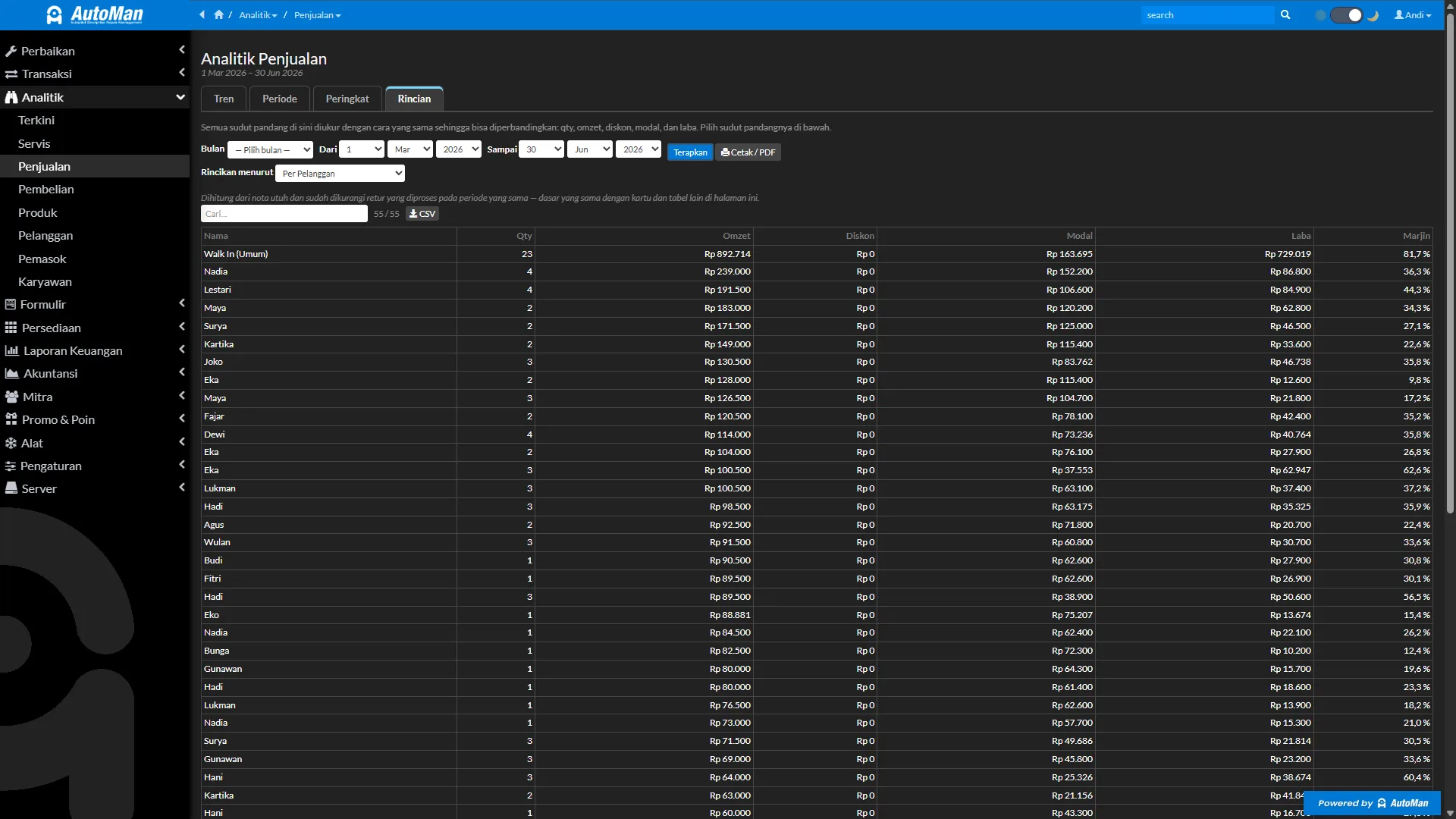
Each primary transaction area — Repairs, Sales, and Purchases — organizes data into four consistent tabs:
- Trend: Plots daily trajectory curves to reveal weekly surges and monthly patterns.
- Period: Compares two custom date intervals, such as comparing current month results against the previous month.
- Rankings: Ranks your highest performers, including top technicians, leading device brands, common repair issues, and active buyers.
- Breakdown: Dissects transactional figures into structured tables using six standardized metrics.
The strength of the Breakdown tab lies in its universal measurement structure: quantity (Qty), gross turnover (Revenue), surrendered discounts, item costs, gross profit, and margin percentage. With identical metrics across every angle, you can fairly compare performance across individual cashiers, product categories, and payment channels. Step-by-step guidance on this structure is detailed in the breakdown tab tutorial.
Workshop repair evaluation: isolating revenue from failed jobs
Workshop owners often misjudge workshop productivity by treating check-in volume as realized revenue. In Repair Analytics, the system strictly separates completed repairs from cancelled or unfixable devices.
Every revenue metric card and financial table counts only tickets that reached full completion. Devices returned unserviced or cancelled by customers remain logged solely as incident counts for technician skill reviews, never inflating gross revenue tallies. This separation ensures your reported gross profit represents realized cash rather than paper earnings from abandoned repairs.
From this same area, you can pair your most frequent incoming device brands with high-consumption components from spare parts inventory. You can walk through this evaluation in the repair analytics tutorial.
Spotting dead inventory and loyal customer habits
Beyond daily transaction streams, four dedicated entity pages guide longer-term management choices:
- Product Analytics: Measures inventory turnover and helps you spot dead stock that is not moving, preventing repetitive orders on slow capital.
- Customer Analytics: Identifies repeat trade versus one-time visitors and measures which customer acquisition channels bring valuable accounts.
- Supplier Analytics: Evaluates which parts vendors you patronize most frequently alongside purchase volume histories.
- Employee Analytics: Evaluates staff productivity across workshop benches and retail registers, highlighting individual repair completion volumes and cashier discount allowances.
Staff members only view the specific analytics screens granted by shop administrators under access control and audit settings, ensuring sensitive cost bases remain protected.
Turning analytical findings into decisive shop actions
Reviewing operational dashboards achieves little if findings remain passive observations. Establish a steady weekly habit: pick one analytics screen, isolate a single operational bottleneck, and execute one practical remedy. That might mean reordering fast-moving charging ports, coaching technicians on recurrent device faults, or tightening cashier discount privileges.
The Analytics module is available without extra fees in Automan — you can switch it on immediately with no add-on charges. Test these analytical workflows on the Automan demo site or inspect full plan capabilities on the pricing page.
Data prerequisites and what happens if disabled
Analytics relies on transactions recorded through Repairs, Sales, or Purchases because every figure is calculated on the fly when the page opens. Breakdowns by brand, fault type, or technician require those fields to be logged during initial ticket entry. Each page has its own permission switch in Access Rights. If the module is disabled: the Analytics menu disappears, requiring manual calculations from raw invoice lists for trends and rankings. Core financial accounting reports continue running normally and no transaction records are lost.
FAQ
How does Business Analytics differ from Financial Reports?
Does the Live Analytics screen consume heavy internet bandwidth?
Do cancelled or failed repair tickets inflate reported revenue?
Is the Analytics module a paid add-on?
Can I monitor business analytics from the Android app?
Related reading
- Tutorial
Read shop data in Analytics
A structured guide to navigating all eight analytics pages based on shop questions.
- Tutorial
Track shop activity in Live Analytics
Monitor active repair queues and today sales in real time without refreshing.
- Tutorial
Read the Breakdown tab in Analytics
Analyze profit margins per item, cashier, customer, and payment method.
- Feature
Owner Financial Reports
Complete accounting statements from cash registers to balance sheets.
Already know the problem?
See the workflow demo that matches it.