

Settling Supplier Payables and Collecting Receivables
The two lists most often forgotten are the two that decide the most: who you have not paid, and who has not paid you.
Both have due dates, and neither one ever shows up in a sales summary.
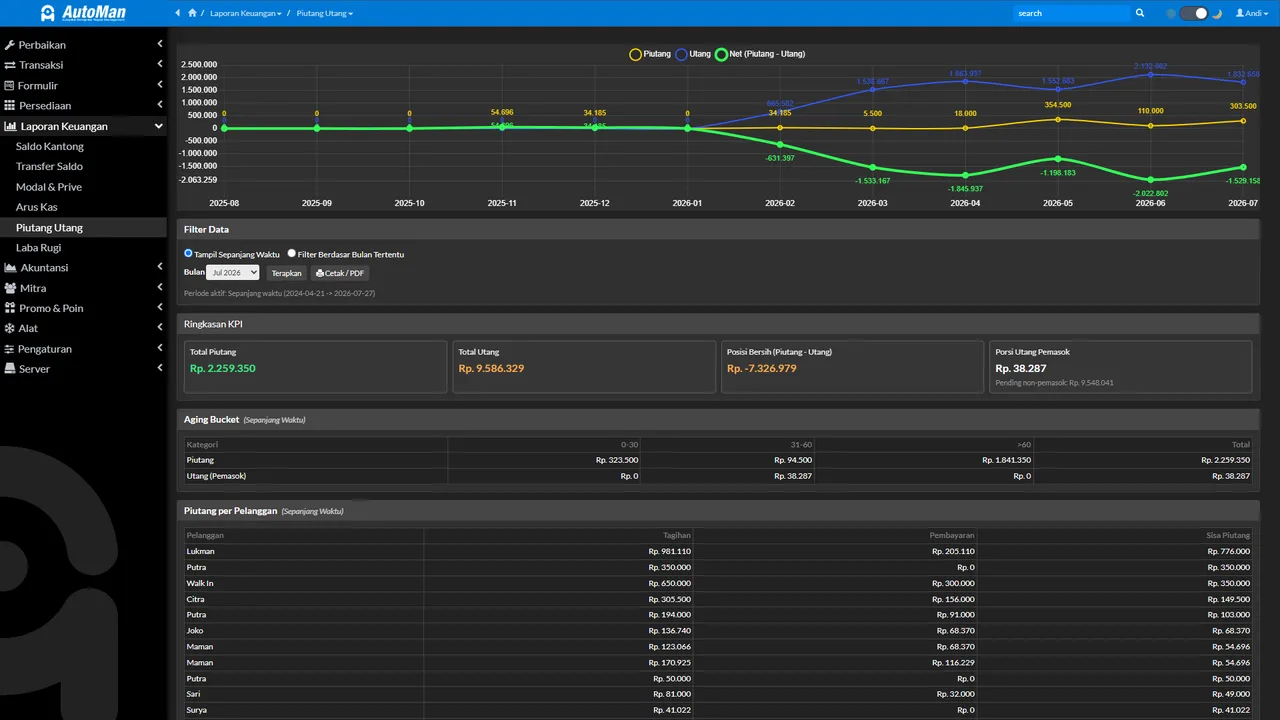
Both share one enemy — forgetting. Automan replaces memory with due-date lists, payments attached to receipts, and settled statuses the system computes. The human job shrinks to two things: read the list every morning, and record every payment on the correct receipt.
Before you start
- Term transactions exist (a term purchase or an unsettled sale/repair).
Steps
-
Open Financial Reports → Receivables & Payables
Two lists worth knowing by heart: payables (the shop hasn't paid suppliers) and receivables (customers haven't paid the shop) — both with due dates in this one menu.

Two essential lists: whom we haven't paid, who hasn't paid us. -
Prioritize what's nearing its due date
Sort by nearest due date. Payables paid on time protect the supplier relationship; receivables collected fast protect the cash.

Prioritize by nearest due date. -
Open the source transaction and add a payment
Payments are recorded on their transaction — never as loose notes — so it's clear which receipt's remainder shrank.

Payments attach to their receipt — not loose notes. -
Record a full payment or an installment
Partial payment? No problem — every installment is recorded with its date and pocket, and the remaining bill stays visible.

Installments recorded one by one; the remainder always visible. -
Let the system compute the status
Settled/Installment/Unpaid changes automatically from the payment total — nothing to flip by hand.

The status is computed by the system from total payments. -
Enable receivable reminders when WhatsApp is connected
Due-date reminders can go to customers automatically — polite, consistent, and independent of the cashier's memory.

Automatic reminders: polite, consistent, memory-free. -
Check the pocket balances after paying
Every payment moves a pocket's balance. Take a moment to match: money recorded in/out matches its pocket.

A quick match: cash moves per the records.
What you end up with
Payables and receivables under control: due dates readable, every payment/installment traceable on its source receipt, settled status computed automatically, and cash moving per the records.
If something goes wrong
Status not flipping to Settled despite payment
Check whether the payment was recorded on the right transaction and covers the entire remainder — any leftover, however small, keeps the status at Installment.
A customer claims they paid but there's no record
Search that receipt's payment history. If it genuinely wasn't recorded, record it now with the real event date — not today's.
Afraid a reminder goes to a customer who already settled
The system re-checks the bill's status right before the reminder sends — settled bills are cancelled from the send queue automatically.