

Handling Sales Returns and Refunds in Automan
The buyer walks back in holding what they bought earlier. Wrong item, does not fit, or genuinely faulty.
What decides whether your shop stays tidy is not how often this happens, but whether the goods and the money both leave a trail once they have gone.
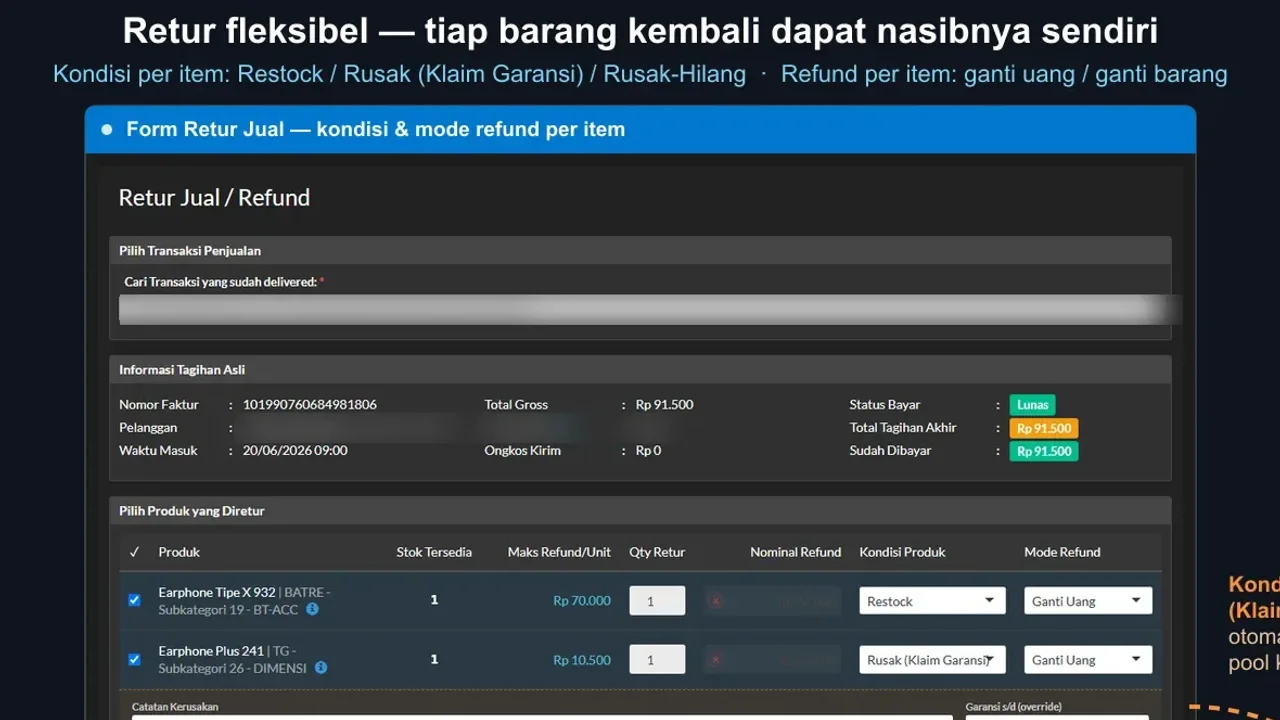
Like repair returns, a sales return in Automan is a first-class transaction: it points at the source receipt, limits qty to what’s still returnable, and recomputes the payment status automatically. The cashier decides only three things — which items, what condition, which compensation — the system does the rest.
Before you start
- The source sales transaction exists in the system.
Steps
-
Open the return from Transactions → Sales
From the sales list, use the Return action on the receipt in question. Returned goods get their own return transaction — never an edit or deletion of the original sale.

A return = its own transaction; the source receipt stays untouched. -
Pick the source sales receipt
A return always points at its source. Search by receipt number or customer name so values and history stay connected.

A return always points at its source receipt. -
Pick the items and quantities coming back
Mark the returned goods; qty can't exceed what's still returnable on that receipt (minus earlier returns).

Qty limited to what's still returnable on that receipt. -
Decide the goods' condition
Restock if fit to sell again (back to stock), Damaged if broken (into the Damaged Stock pool — can continue into a supplier claim), or Loss if written off.

Condition decides the goods' path: stock, damaged pool, or write-off. -
Decide the buyer's compensation
A cash refund, or an exchange for the same product (same-product). If the source receipt isn't settled, the return value offsets the outstanding bill first — cash refunds cover only the excess.

Unsettled receipt? The return value offsets the bill first. -
Save the return
The system recomputes the source receipt's payment status and records the stock movement per the chosen condition.

The source receipt's status is recomputed automatically. -
Check stock and the source receipt's status
Confirm restocked goods returned to stock, damaged goods entered Damaged Stock, and the settled/unsettled status on the source receipt is right.

Check the stock movement matches the chosen condition.
What you end up with
Returned goods recorded as a return pointing at the source receipt; stock, receivables, and reports corrected automatically through a traceable path.
If something goes wrong
The return qty gets rejected
Qty can't exceed what's still returnable — check whether the same receipt was partially returned before.
The replacement can't be chosen freely
Deliberate: the replacement must be the same product so cost and reports stay accurate. If the buyer wants a different item, finish a refund return and make a new sale.
The buyer wants cash back on an unsettled receipt
The system offsets the outstanding bill first; cash leaves only for the excess of the return value over the remaining bill. This protects the shop from double refunds.