

Reading the Lite Financial Reports
You know the shop was busy this month. What you do not know is whether busy made any money.
Those are two different questions, and only one of them can be answered by looking in the drawer. The lite reports answer the other one, without you needing to understand debits and credits.
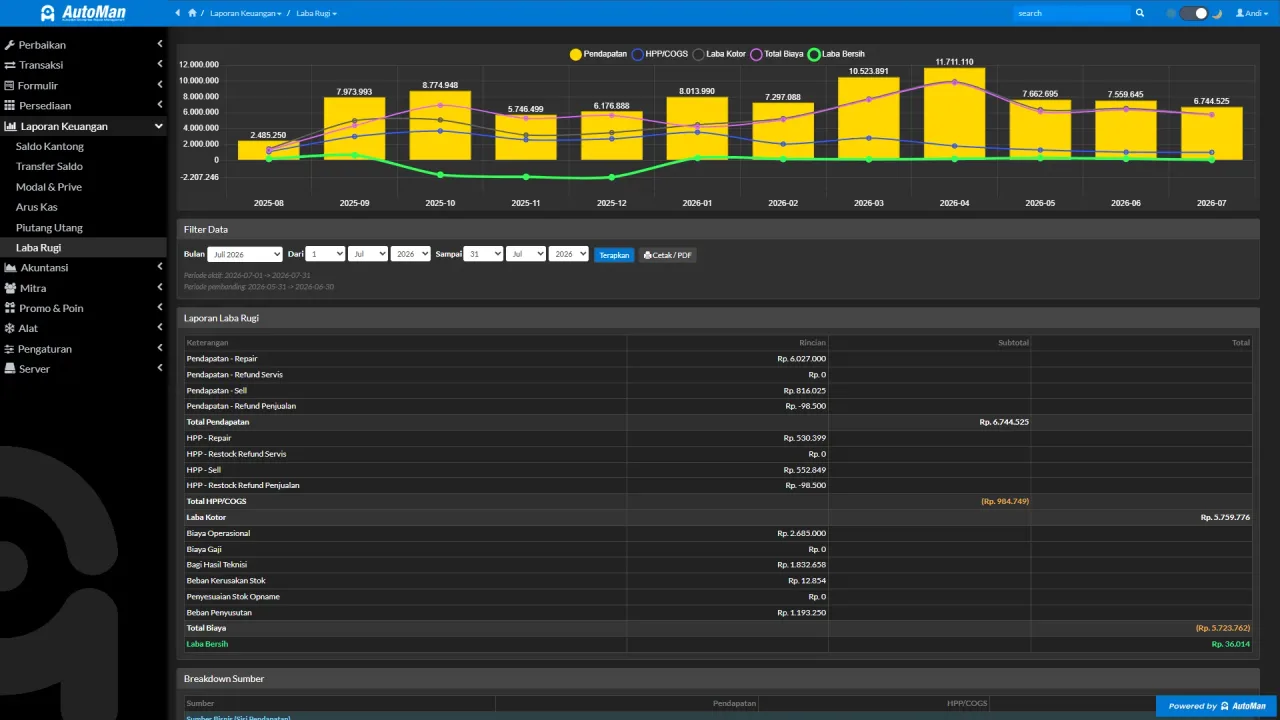
The most effective usage isn’t monthly but as a short routine: channel balances and receivables every morning, cash flow and P&L every weekend. Five minutes that replace an all-night recap.
Before you start
- Transactions already running (repairs/sales/purchases recorded).
Steps
-
Open the Pocket Balances report (balances per channel)
See the money's position per storage place: cash drawer, bank accounts, e-wallets. The fastest answer to "where is our money".

The fastest answer to "where is our money right now". -
Check the cash flow for a period
Money in and out within a date range — not revenue, but the actual movement of cash.

Cash flow = actual money movement, not just revenue. -
Check receivables and payables
Who hasn't paid the shop, and whom the shop hasn't paid — complete with due dates.

Who hasn't paid the shop, and whom the shop hasn't paid. -
Check the profit & loss report
Revenue minus the cost of goods consumed (COGS) and expenses. A "profit" figure that reality has already been subtracted from.

A profit figure already reduced by goods cost and expenses. -
Use the period filters
Compare this week vs last week, or read a full month. Make sure the date range matches your intent.

Confirm the date range matches your intent before reading numbers. -
Trace to source transactions when a number feels off
Report numbers come from transactions. When something looks strange, open the source transaction first before concluding a miscalculation.

Odd number? Open the source transaction before concluding.
What you end up with
The owner reads the shop's condition — cash position, receivables/payables, and profit — straight from transactions, with no manual recaps and no accounting background needed.
If something goes wrong
The report looks empty
Check the period filter — make sure the transaction dates fall inside the chosen range.
A number feels off
Trace to the source transactions first (payment dates, returns, channels) before concluding a miscalculation.
Profit in the report does not match the cash in the drawer
They are different figures and both are correct. Profit counts goods consumed and expenses recorded; the drawer only counts what moved today. Receivables and stock guarantee the two never match.
When is Lite no longer enough
When you start needing a balance sheet, journals, or statements you can hand to an accountant or a bank. While the question is still “how much did we make this month”, Lite already answers it.